AI for litigation, every fact cited from intake to trial
Litigators receive a deposition outline, a draft privilege log and motion arguments from the case file, with each fact and each authority cited. AtlasAI reads the case file, your firm's prior matters against the same opposing counsel and the published opinions of the assigned judge in CourtListener.
3-day free trial on one matter. No setup fee.
Attorneys draft, review and research with AtlasAI, starting from their best past work.



An associate drafts a deposition outline from the case file
Halden Logistics supply dispute, a litigation matter.
What AtlasAI reads
 iManage
 SharePoint

 Halden Logistics supply disputeHalden operations managerResponsive review setSam Okafor, Associate
You ask
A deposition outline by topic, with each question tied to a cited exhibit from the responsive review set
The associate asks
Sam Okafor asks AtlasAI for a deposition outline for the Halden operations manager, from the responsive documents of the review.
AtlasAI reads the review set
AtlasAI reads the documents the operations manager authored or received, and the supply agreement.
AtlasAI drafts
AtlasAI drafts the outline by topic, with each question tied to a cited exhibit.
The attorneys decide
Sam Okafor edits the outline in Word, and the supervising litigation partner approves the outline before the deposition.
Discovery and review
The full case file, reviewed and organized
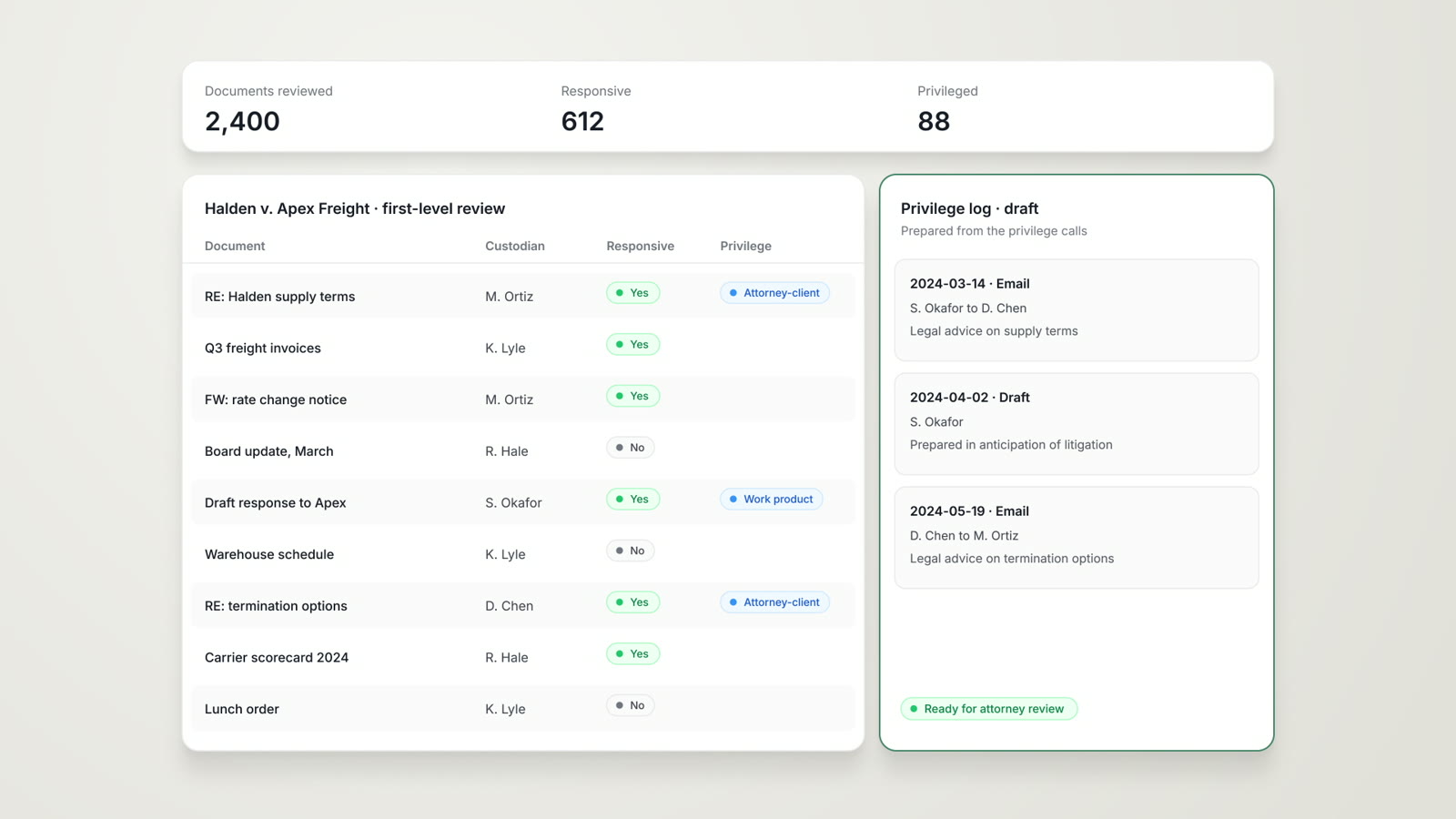
The litigation team uploads the case file, and AtlasAI extracts the key facts, flags privileged material and categorizes each document by relevance and by issue. AtlasAI organizes the documents by custodian and by issue, with a citation for each fact.
- Key factsAn attorney asks AtlasAI for the key facts of the case file on notice, performance and termination, and AtlasAI cites the document behind each fact.
- PrivilegeAtlasAI flags privileged material and drafts the privilege log for your review.
- Custodian and issueAtlasAI groups the documents by custodian and by issue in one table.
Case strategy
Case strategy grounded in authority and firm history
AtlasAI reads the assigned judge's published opinions in CourtListener and your firm's prior matters against the same opposing counsel. Your litigation team builds the case strategy from the cited opinions and from comparable outcomes on your firm's past matters.
- The assigned judgeAn attorney asks for the published opinions of the assigned judge on a motion to dismiss, and AtlasAI verifies each opinion in CourtListener.
- Opposing counselAtlasAI lists your firm's prior matters against the same opposing counsel, with the outcome of each matter.
- Comparable outcomesAtlasAI cites your firm's comparable matters and the outcome of each matter.
Depositions and motions
Deposition outlines and motions from the case documents
AtlasAI drafts deposition outlines from the case documents and motion arguments grounded in precedent and the opinions of the court. Edit each draft in Word, with each exhibit and each authority cited.
- Deposition outlinesAtlasAI drafts the outline by topic, with each question tied to the cited exhibit.
- Motion argumentsAtlasAI drafts each argument with the governing authority verified in CourtListener.
- In WordThe AtlasAI add-in inserts each draft into Word as tracked changes for the review of the attorney.
Trial preparation
Chronologies, witness materials and trial notebooks
AtlasAI assistants build exhibit chronologies, witness preparation materials and trial notebooks from the analyzed case data. Each entry cites the exhibit or the transcript behind the entry.
- Exhibit chronologiesAn assistant builds a chronology of the key events, with the exhibit cited for each event.
- Witness preparationAn assistant prepares the topics and the documents for each witness.
- Trial notebooksThe firm publishes the trial preparation assistants to the litigation group from one library.
From intake to trial
Case intake
AtlasAI analyzes the complaint, the statutes of limitation and your firm's comparable outcomes, in AtlasAI Chat.
Discovery
AtlasAI reads the review set the litigation team uploads, flags privileged material, extracts key facts and organizes the documents by custodian and issue, in Tabular Review.
Depositions and motions
AtlasAI drafts deposition outlines from the case documents and motion arguments grounded in precedent and the opinions of the court, in Word.
Trial preparation
AtlasAI assistants build exhibit chronologies, witness preparation materials and trial notebooks from the analyzed case data.
Built for the security review of a law firm
AtlasAI runs the security program on the SOC 2 Trust Services Criteria, and the AtlasAI security team shares the current audit status and the control documentation with your security reviewers. Under NDA, your security reviewers receive the AtlasAI Security and Compliance Posture Report and 12 corporate policies. Each deploying firm also receives the penetration test results.
Your deployment
Run AtlasAI in the AtlasAI cloud or in your firm’s Azure subscription, with the same controls in both.
Your permissions
AtlasAI agents read only the documents each user may open, with your iManage permissions and ethical walls applied to every step.
Your data
AtlasAI trains no model on your data, and every approved model provider works under zero data retention terms.
Your audit log
AtlasAI logs every question, answer and agent step. The managed service keeps the log for 365 days, with export, and a self-hosted deployment streams the log into your SIEM.
Explore AtlasAI by practice
AI eDiscovery
First-level review with responsive and privilege tags, a draft privilege log, version comparison and one search across firm systems.
Read more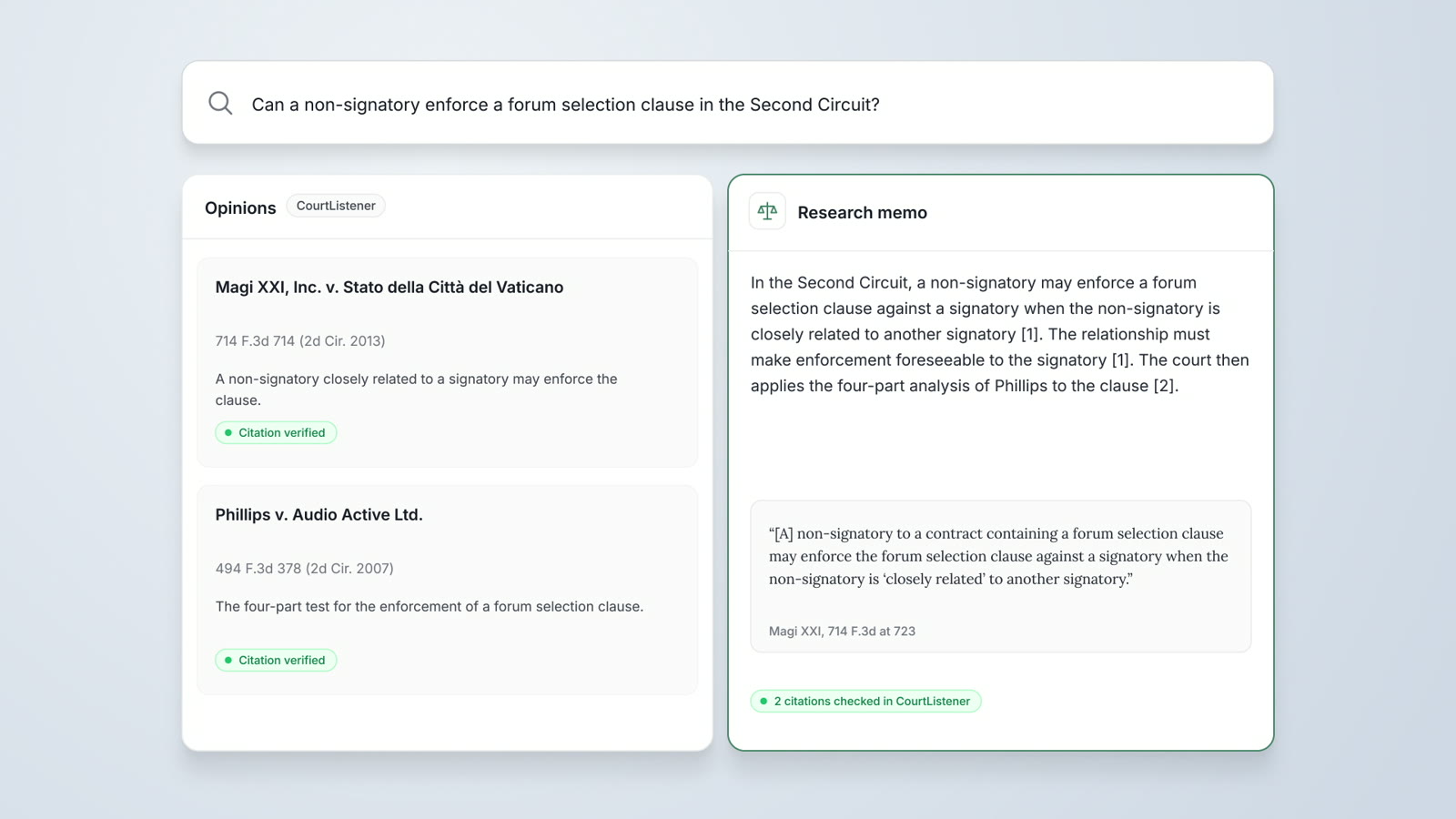
Legal Research
Research agents verify each opinion in CourtListener, cite SEC filings from EDGAR and prepare a cited research memo.
Read more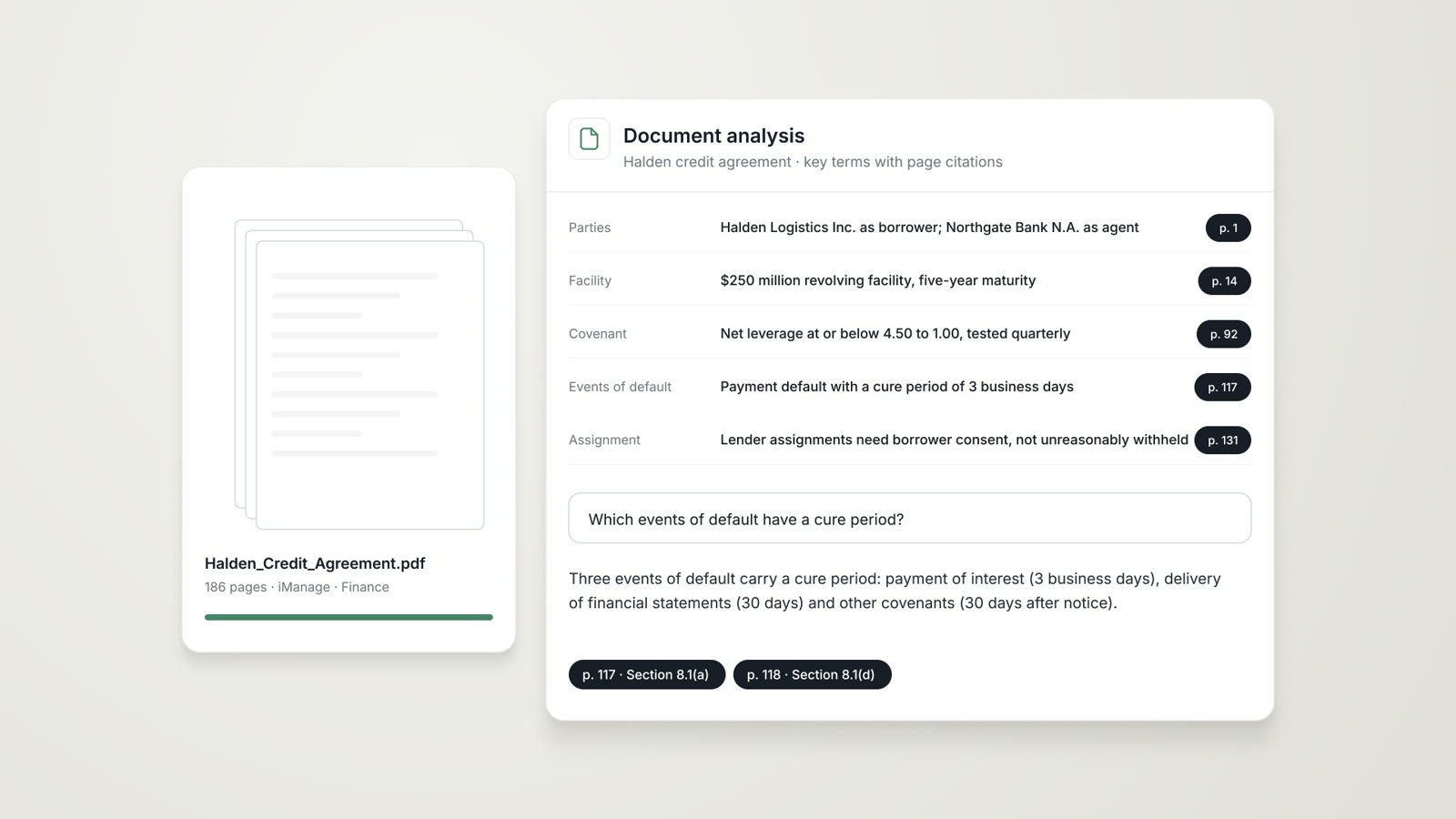
Data Analysis
Billing entries, financial statements and transaction data analyzed, with anomalies flagged and each finding tied to the source rows.
Read moreQuestions attorneys ask
What does AtlasAI do for a litigation practice?
AtlasAI reviews case files, flags privileged material, researches case law verified in CourtListener and drafts deposition outlines, motions and trial materials, with each fact and authority cited.
Can AtlasAI review a case file for privilege?
Yes. AtlasAI flags privileged material with the basis cited and drafts the privilege log, and you approve each entry before production.
Which sources does AtlasAI use for case law?
AtlasAI uses CourtListener for case law and checks each citation against the opinion, together with your firm's prior research and matters.
Can AtlasAI analyze the assigned judge?
AtlasAI reads the published opinions of the assigned judge in CourtListener and summarizes the rulings on the question, with each opinion cited.
Can AtlasAI prepare a damages calculation?
Yes, on Enterprise. Data Analysis prepares a damages calculation from uploaded XLSX and CSV data. The inputs, assumptions and source rows are stated for review by the attorney and the damages expert.
Who sees the case file?
Each user sees only the documents that user may open, with your firm's iManage permissions and ethical walls applied to every answer and agent step.
Which plan fits a litigation practice?
Professional at $99 per user per month, with a minimum of 5 users, includes Tabular Review, Legal Research with CourtListener and Agentic Workflows. Enterprise adds AI Assistants and Data Analysis, and every plan starts with a 3-day free trial on one matter.