See AtlasAI on your practice areas
Book a walkthrough with an AtlasAI engineer. The engineer shows how AtlasAI reads iManage and SharePoint, connects your firm's work in one knowledge graph and cites every statement, for the practice areas you pick.
3-day free trial on one matter. No setup fee.
Something went wrong. Please try again or email us directly.
Thank you for your interest.
Pick a time below that works for you, and we’ll have a personalized demo ready.
Attorneys draft, review and research with AtlasAI, starting from their best past work.



Your practice areas
A walkthrough tailored to your practice
The AtlasAI engineer tailors the walkthrough to the area you pick: litigation, M&A and transactions, insurance, banking and finance, tax, regulatory and compliance, in-house, legal operations or a firm-wide deployment. The walkthrough shows cited answers, document review and drafting on matters from that practice.
- Cited answersThe engineer asks a question on a matter, and AtlasAI answers with a citation to the source passage for each statement.
- Review and draftingThe engineer reviews a draft against a playbook in Word and inserts a tracked change.
- Your questionsYour attorneys ask the questions your practice asks every day.
Your deployment
The AtlasAI cloud or your Azure subscription
The engineer shows both deployment models: the AtlasAI cloud and your firm's Azure subscription. The cloud uses a US region by default, or an EU, UK or Canada region on Enterprise, and a self-hosted deployment can use any Azure region. The controls are the same in both.
- No trainingUnder the Master Subscription Agreement, AtlasAI uses no customer data to train, fine-tune or improve any model.
- EncryptionAtlasAI encrypts data with AES-256 at rest and TLS 1.2 or higher in transit, with customer-managed keys on Enterprise and in self-hosted deployments.
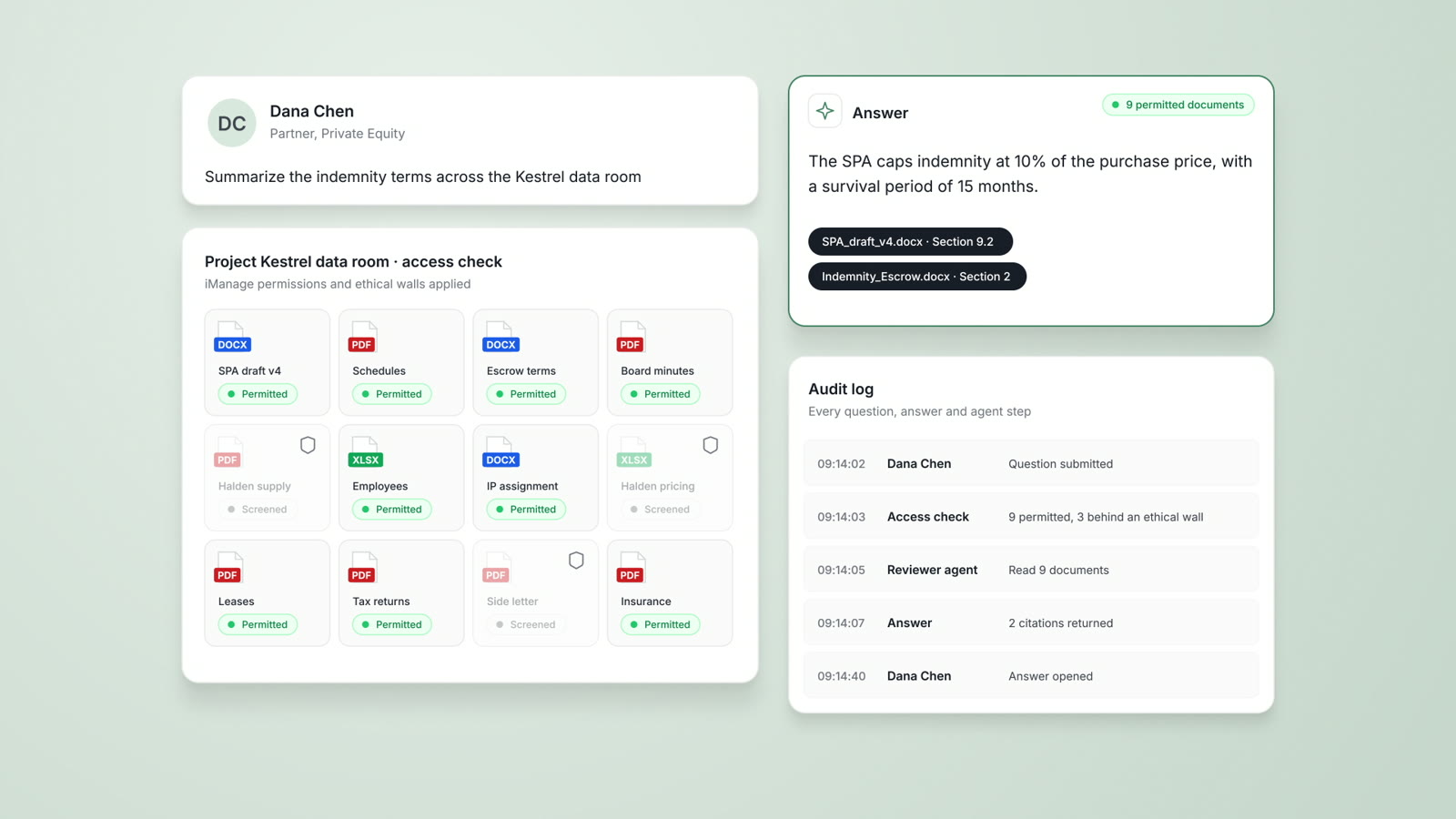
- Audit logAtlasAI logs every question, answer and agent step.
Your document systems
iManage, SharePoint and Word, connected
The engineer shows the iManage, SharePoint and OneDrive integrations and the AtlasAI add-in for Word. Attorneys search, analyze and draft without leaving your firm's systems, with iManage permissions and ethical walls applied to every answer.
- iManageState the clause, the client and the year, and AtlasAI narrows the iManage matters to the governing clause.
- File typesAtlasAI reads PDF, DOCX, PPTX, XLSX, TXT, CSV and scanned documents.
- Single sign-onAttorneys sign in with Microsoft or Google on every plan, and with SAML or OIDC single sign-on through Microsoft Entra ID or Okta, with MFA, on Enterprise.
The walkthrough for each primary interest
Select a primary interest on the form, and the AtlasAI engineer prepares the walkthrough for the interest.
| Primary interest | What the walkthrough shows |
|---|---|
| Litigation | First-level review with privilege tags, a draft privilege log and research verified in CourtListener |
| M&A and transactions | Data room review, deal terms compared with firm precedent and an SPA drafted from accepted positions |
| Insurance | Claims matched against policy terms and a coverage opinion with cited case law |
| Banking and finance | A credit agreement analyzed with page citations and a policy compared with uploaded guidance |
| Tax | Transfer pricing requirements compared across jurisdictions, with each source cited |
| Regulatory and compliance | Compliance obligations mapped to policies, with each gap cited |
| In-house | Contract renewals, obligations and auto-renewal deadlines across a contract portfolio |
| Legal operations | Write-off analysis by practice group and your firm's assistant library |
| Firm-wide deployment | The deployment models, iManage permissions and ethical walls, single sign-on and the audit log |
A walkthrough on a private equity M&A matter
Project Loom, a private equity M&A matter.
What AtlasAI reads
 iManage
 SharePoint

 Project LoomSharePointIndemnity cap at 10% of the purchase priceiManageBrightwell Holdings SPA, signedDana Chen, Partner, Private Equity
You ask
The Loom draft departs from the cap at 10% of the purchase price that the firm accepted on Brightwell, with both clauses cited
The engineer opens a matter
The AtlasAI engineer opens Project Loom, a private equity M&A matter with a signed precedent and a draft.
The partner asks
Dana Chen asks which indemnity cap the firm accepted on Brightwell, and whether the Loom draft matches.
AtlasAI answers
AtlasAI answers that the Loom draft departs from the accepted cap, and cites both clauses.
The partner checks
Dana Chen opens Section 8.3 of the signed Brightwell agreement and moves the markup into the Loom draft in Word.
After you book
Submit the form
Enter your work email, firm, job title and primary interest, with no commitment.
Pick a time
After the form, pick a time for the walkthrough with an AtlasAI engineer.
The walkthrough
The engineer shows AtlasAI on matters of the practice areas you selected, and answers the questions of your attorneys and your security team.
The trial
Start a 3-day free trial on one of your matters, with no setup fee.
Built for the security review of a law firm
AtlasAI runs the security program on the SOC 2 Trust Services Criteria, and the AtlasAI security team shares the current audit status and the control documentation with your security reviewers. Under NDA, your security reviewers receive the AtlasAI Security and Compliance Posture Report and 12 corporate policies. Each deploying firm also receives the penetration test results.
Your deployment
Run AtlasAI in the AtlasAI cloud or in your firm’s Azure subscription, with the same controls in both.
Your permissions
AtlasAI agents read only the documents each user may open, with your iManage permissions and ethical walls applied to every step.
Your data
AtlasAI trains no model on your data, and every approved model provider works under zero data retention terms.
Your audit log
AtlasAI logs every question, answer and agent step. The managed service keeps the log for 365 days, with export, and a self-hosted deployment streams the log into your SIEM.
Before the walkthrough
Security and trust
Deployment in the AtlasAI cloud or your firm's Azure subscription, iManage walls on every answer, and a log of every agent step.
Read more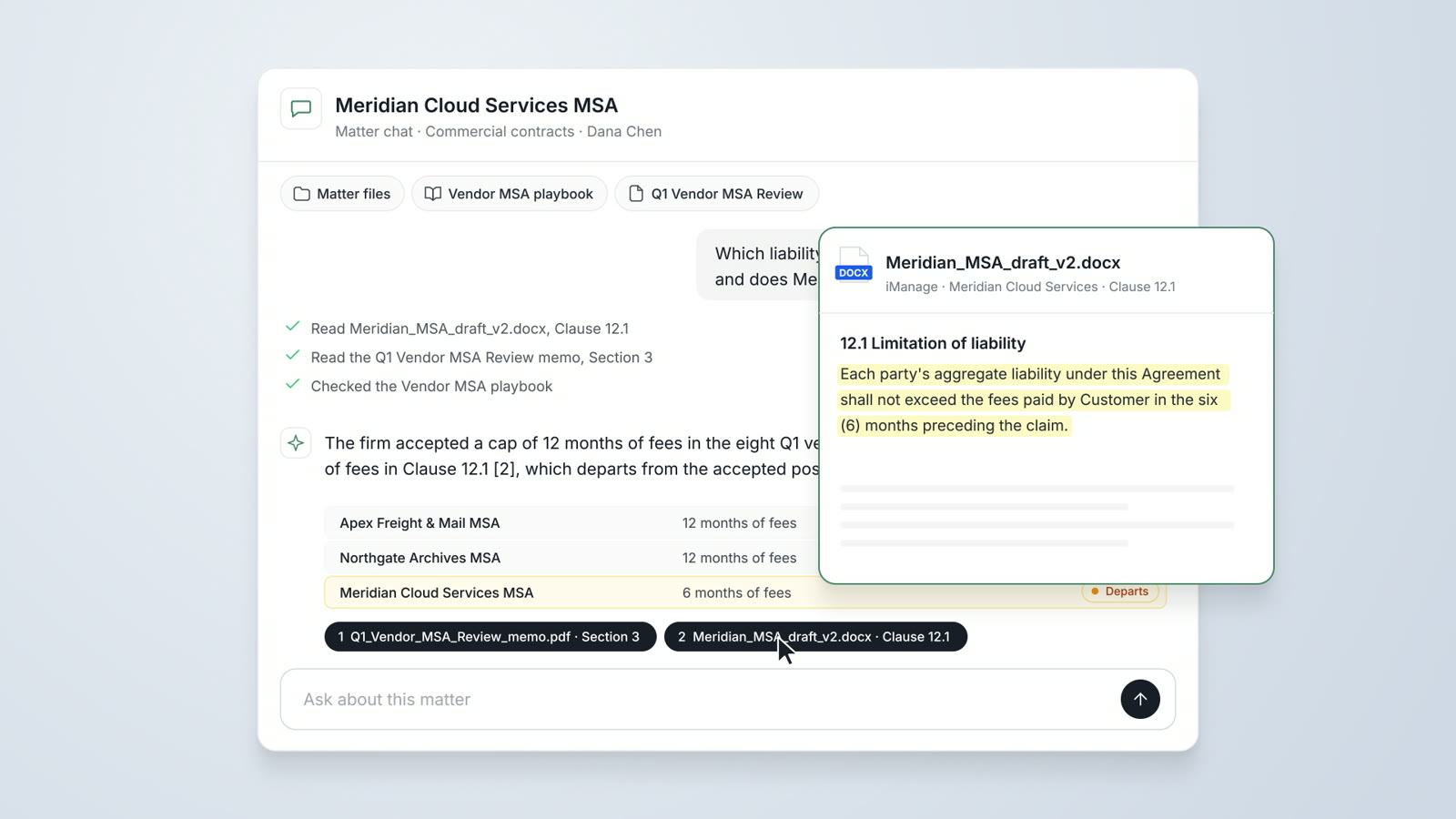
AtlasAI Chat
Answers from your firm's matters, accepted positions and precedents, with a citation on every statement.
Read more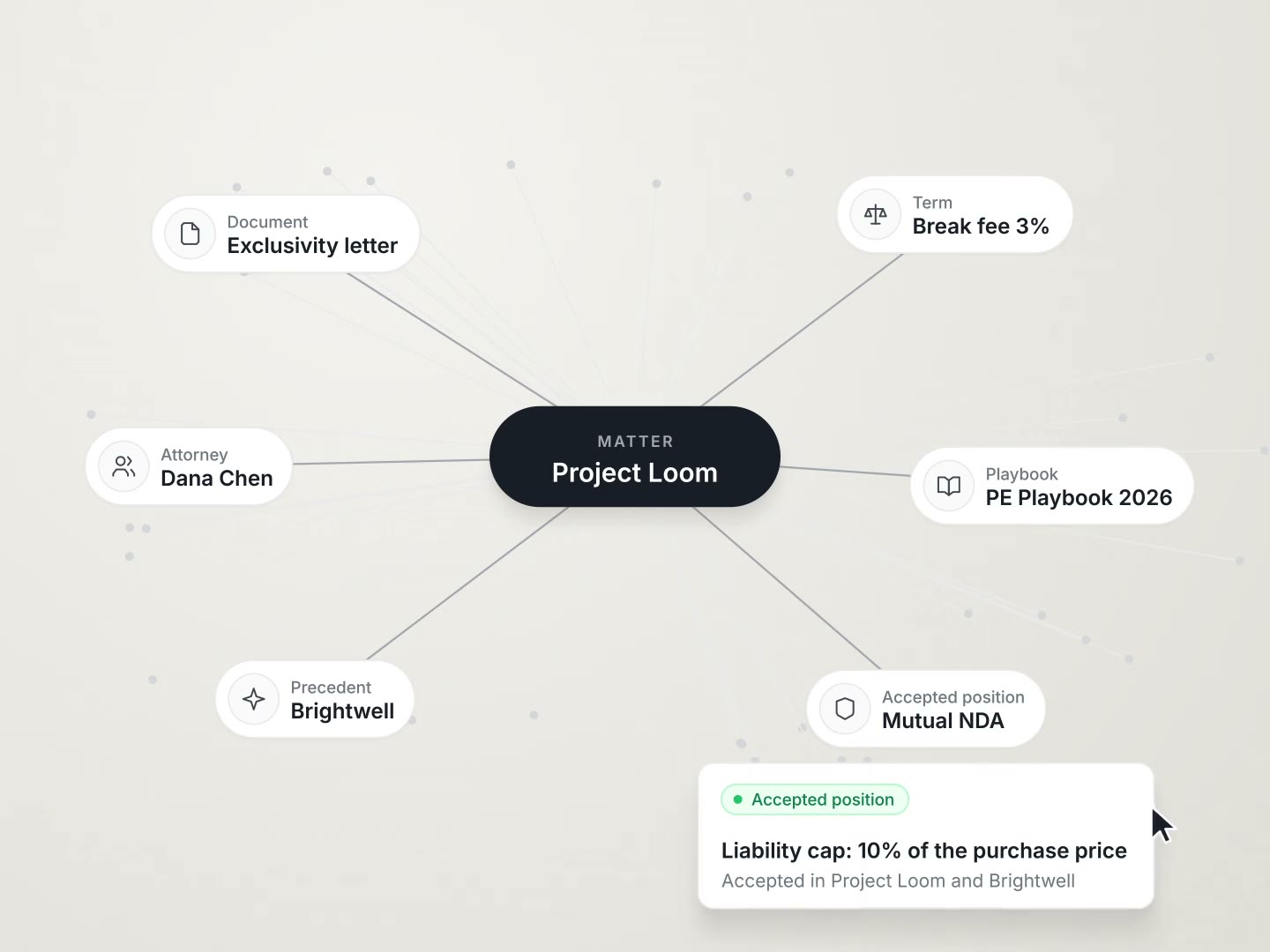
Law firms
Your firm's strongest precedent on request, write-off analysis by practice group and client-ready matter reports.
Read moreQuestions attorneys ask
How is AtlasAI deployed?
AtlasAI runs in the AtlasAI cloud or in your firm's Azure subscription, with the same controls in both. The cloud uses a US region by default, or an EU, UK or Canada region on Enterprise.
Which document types does AtlasAI support?
AtlasAI supports PDF, DOCX, PPTX, XLSX, TXT, CSV and scanned documents, and integrates with iManage, SharePoint and OneDrive.
How does AtlasAI differ from a general-purpose chatbot?
AtlasAI is built for legal work. Every answer draws on your firm's documents with a citation to the source passage, and AtlasAI runs under your firm's controls with no customer data used for training.
What is the compliance status of AtlasAI?
AtlasAI runs the security program on the SOC 2 Trust Services Criteria, and the AtlasAI security team shares the current audit status and the control documentation with your security reviewers. AtlasAI maps the control set to the HITRUST CSF e1 tier, offers a BAA on Enterprise and offers a standard DPA covering GDPR and CCPA, with sub-processor disclosure.
Can AtlasAI connect to our document management system?
Yes, on Professional and Enterprise. AtlasAI connects to iManage, SharePoint and OneDrive through your firm's single sign-on, and applies iManage permissions and ethical walls to every answer and agent step.
Does the walkthrough use our documents?
The engineer shows AtlasAI on sample matters from the practice areas you pick. The 3-day free trial runs on one of your matters.
What does AtlasAI cost?
Starter costs $25 per user per month, Professional costs $99 per user per month with a minimum of 5 users, and Enterprise pricing comes from AtlasAI sales. Every plan starts with a 3-day free trial on one matter, with no setup fee.