iManage and SharePoint, connected to AtlasAI
Search, open and analyze your iManage, SharePoint and OneDrive documents without leaving AtlasAI. Your firm's iManage permissions and ethical walls apply to every answer and agent step.
3-day free trial on one matter. No setup fee.
Attorneys draft, review and research with AtlasAI, starting from their best past work.



Connected to the systems your firm already uses
AtlasAI reads documents, matters and positions from the systems your firm already uses, and applies each system’s permissions to every answer.
 iManage
Workspaces, folders and documents from iManage Work, with new versions saved back to the workspace.
 SharePoint
Sites and document libraries, indexed with each library's permissions.

Workspaces and documents from NetDocuments, read with each attorney's access rights.

Clients, matters and attorney assignments from Intapp, so every answer starts from the matter.
iManage integration
Search and analyze directly from iManage
AtlasAI connects to iManage Work and keeps your firm's security model and workspace structure as they are. Search across workspaces, move documents into AI workflows and save the results back to iManage.
- WorkspacesAn attorney opens the Q1 Vendor MSA Review workspace and asks AtlasAI to extract the clauses of the vendor agreements.
- Access rights and wallsAtlasAI applies your existing iManage access rights and ethical walls, so each user sees only the documents that user may open in iManage.
- Save backSave AtlasAI output, such as a memo or a markup, back to the matter's iManage workspace.
Unified access
One interface for every document system
Whether your firm uses iManage, SharePoint, OneDrive or a mix, AtlasAI gives you one place to search, browse and open documents across every system.
- Across systemsAn attorney asks for the latest board resolution of a client across iManage and SharePoint.
- The SharePoint scopeYour firm picks the SharePoint sites and folders AtlasAI reads.
- The original documentOpen the original document in iManage or SharePoint from each result.
Semantic search
Search by legal concept, across every workspace
AtlasAI searches your connected workspaces and libraries by meaning as well as keywords. Describe the clause, client, counterparty and year, and AtlasAI finds the matching clause.
- Legal conceptsA search for change of control returns the clauses that address a change of control under any heading.
- Matter contextAtlasAI groups the results by matter, with the client and the counterparty of each matter.
- Cited answersAtlasAI answers the question across the results, with a citation for each statement.
Into workflows
Documents into AI workflows, without download
Move documents from iManage or SharePoint straight into analysis, extraction, drafting and review, with no manual download or upload.
- Tabular ReviewSend a workspace's vendor agreements to Tabular Review for clause extraction.
- WordThe AtlasAI add-in for Word opens the draft from the workspace and inserts each change as a tracked change.
- Agentic WorkflowsAtlasAI agents read the workspace documents at each step, with the user's permissions applied.
An associate extracts clauses from an iManage workspace
Q1 Vendor MSA Review, a commercial contracts matter.
What AtlasAI reads
iManageSharePointQ1 Vendor MSA ReviewiManage, Commercial ContractsSharePointLiability cap at 12 months of feesMaya Ortiz, AssociateYou ask
A table of the liability caps of the Q1 vendor MSAs, each cell cited, saved back to the iManage workspace of the matter
The associate selects the workspace
Maya Ortiz selects the Q1 Vendor MSA Review workspace in iManage from AtlasAI.
AtlasAI applies access
AtlasAI reads only the vendor MSAs Maya Ortiz may open in iManage, with the firm's ethical walls applied.
AtlasAI extracts
AtlasAI extracts the liability cap of each MSA into a table, with a citation in each cell.
The associate saves back
Maya Ortiz checks the flagged caps and saves the table back to the iManage workspace for Dana Chen.
From connection to cited answers
Connect the DMS
Connect AtlasAI to iManage Work, SharePoint and OneDrive.
Index the workspaces
AtlasAI indexes the workspaces and document libraries you select, under your firm's iManage security and permissions.
Search across systems
Attorneys search across all connected systems from one interface, with semantic search across legal concepts.
Move into workflows
Attorneys move documents into analysis, extraction, drafting and review, and save the results back to iManage.
Built for the security review of a law firm
AtlasAI runs the security program on the SOC 2 Trust Services Criteria, and the AtlasAI security team shares the current audit status and the control documentation with your security reviewers. Under NDA, your security reviewers receive the AtlasAI Security and Compliance Posture Report and 12 corporate policies. Each deploying firm also receives the penetration test results.
Your deployment
Run AtlasAI in the AtlasAI cloud or in your firm’s Azure subscription, with the same controls in both.
Your permissions
AtlasAI agents read only the documents each user may open, with your iManage permissions and ethical walls applied to every step.
Your data
AtlasAI trains no model on your data, and every approved model provider works under zero data retention terms.
Your audit log
AtlasAI logs every question, answer and agent step. The managed service keeps the log for 365 days, with export, and a self-hosted deployment streams the log into your SIEM.
Related capabilities
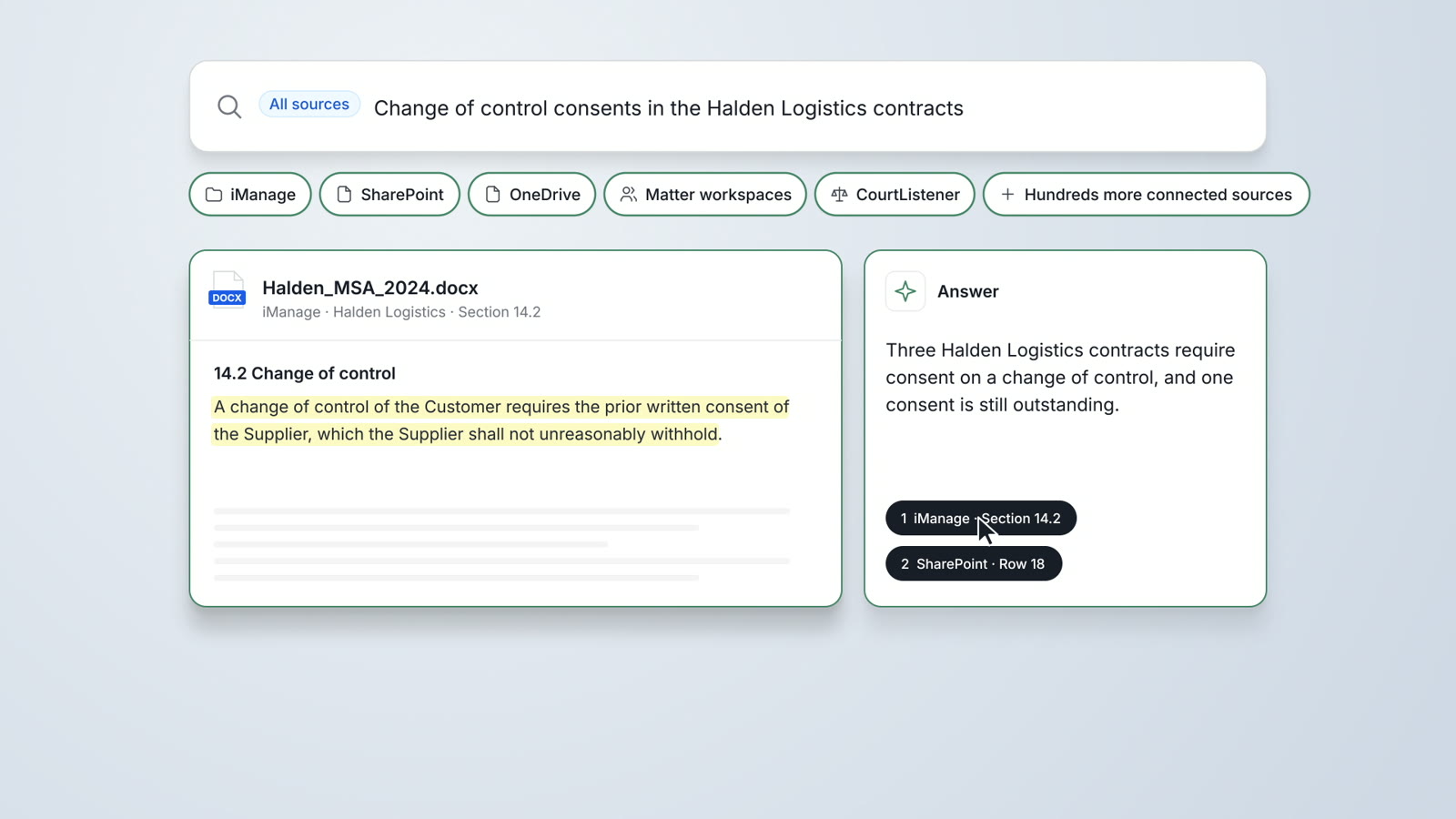
Enterprise Search
One search across iManage, SharePoint, OneDrive, matter workspaces and CourtListener, with a cited answer and the original document.
Read more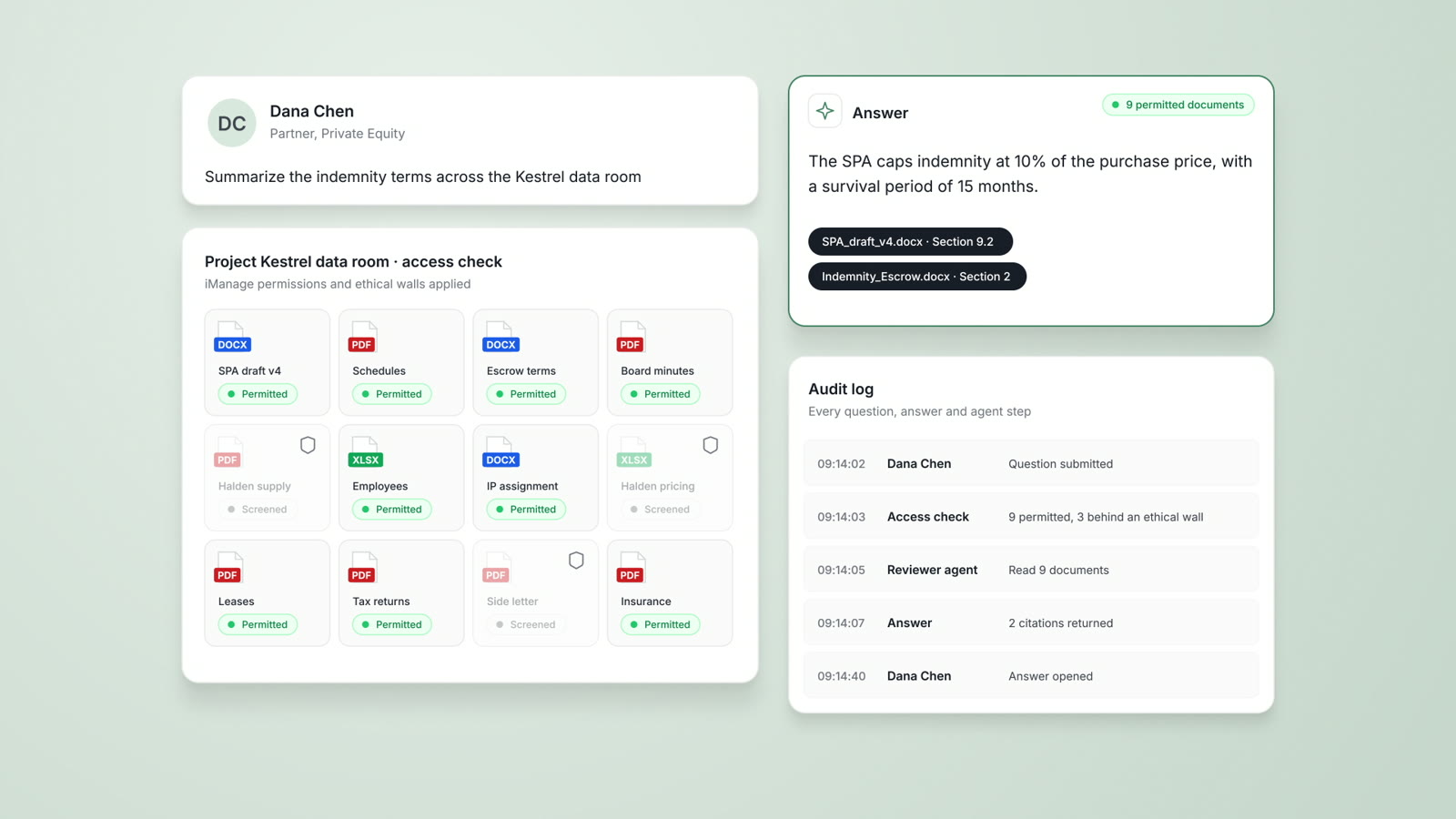
Security and trust
Deployment in the AtlasAI cloud or your firm's Azure subscription, iManage walls on every answer, and a log of every agent step.
Read more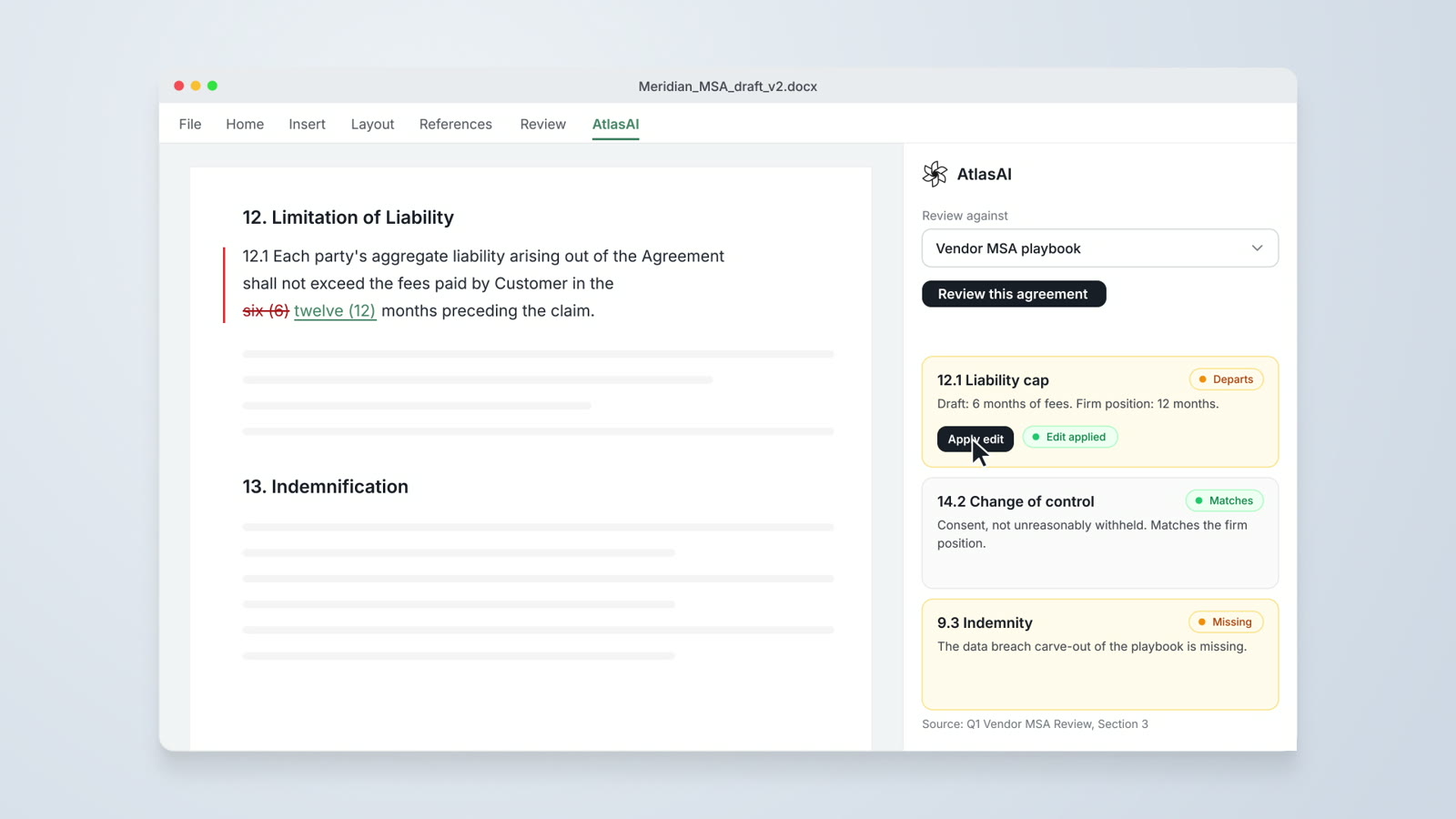
AtlasAI for Word
Drafting from precedent, redlines against preferred language and playbook checks, inside Microsoft Word.
Read moreQuestions attorneys ask
Which document systems does AtlasAI connect to?
AtlasAI connects to iManage Work, Microsoft SharePoint, OneDrive and NetDocuments, together with your matter workspaces.
Does AtlasAI change our iManage security model?
No. AtlasAI applies your existing iManage access rights and ethical walls, so each user sees only the documents that user may open in iManage.
Which SharePoint content does AtlasAI read?
AtlasAI reads the SharePoint sites and folders your firm selects, after your administrator grants consent.
Can AtlasAI save results back to iManage?
Yes. Save AtlasAI output, such as a memo, a table or a markup, back to the matter's iManage workspace.
Do attorneys download documents to use AtlasAI?
No. Attorneys move documents from iManage or SharePoint directly into analysis, extraction, drafting and review.
Which plan includes DMS integration?
The iManage, SharePoint and NetDocuments integrations are part of the Professional plan, at $99 per user per month with a minimum of 5 users. Every plan starts with a 3-day free trial on one matter.
Where does AtlasAI process the documents?
AtlasAI processes the documents in your firm's Azure subscription or in the AtlasAI cloud, with the same controls in both, and trains no model on your data.