AI eDiscovery, every document tagged and cited
AtlasAI reviews a collected document set against the review protocol, tags each document for responsiveness and privilege with the basis cited and drafts the privilege log. AtlasAI operates inside your firm's controls, and attorneys decide each call.
3-day free trial on one matter. No setup fee.
Attorneys draft, review and research with AtlasAI, starting from their best past work.


Mass document review
Structured questions across the full document set
In Tabular Review, AtlasAI answers the same structured questions across an entire document set. You extract key terms, compares provisions, flags departures and ask follow-up questions about the results in one place.
- ExtractionAn attorney asks for the indemnification clauses, the governing law provisions and the termination triggers across the contracts of the review set.
- A citation in each cellEach cell cites the passage in the source document, and you open the passage from the cell.
- Questions about the resultsAsk AtlasAI Chat about the extracted data, such as which contracts share a termination trigger.
Privilege and defensibility
Privilege tags and a draft privilege log
AtlasAI tags each document for privilege with the basis cited, and drafts the privilege log from the tags for the review of the attorney. AtlasAI logs every question, answer and agent step, so the firm can account for each call in the review.
- Privilege basisEach privilege tag states the basis, such as attorney-client communication or work product, with the passage cited.
- The draft logAtlasAI drafts an entry in the privilege log for each privileged document, and you approve each entry.
- Walls and permissionsAtlasAI applies your firm's iManage permissions and ethical walls to every document in the review.
Document comparison
Versions compared, material changes flagged
AtlasAI places two versions of a document side by side, highlights the differences and identifies the material changes. You receive a structured comparison report with each change cited to the section of each version.
- Substantive changesAn attorney asks AtlasAI to compare two versions of a settlement agreement and flag every substantive change.
- Structured reportsThe comparison report groups the changes by section and by type of change.
- Long documentsAtlasAI reads long agreements in full, with page citations for each term and each change.
Cross-system discovery
One search across your firm's systems
AtlasAI searches iManage, SharePoint, OneDrive and your firm's matter workspaces from one interface. You find the relevant documents across systems without a change of application, with iManage permissions and your firm's document access rules applied.
- Matter and periodAn attorney asks for every document and contract related to the Meridian matter from 2023 to 2025, and AtlasAI returns the documents from each system.
- Cited answersAtlasAI answers questions across the results, with a citation for each statement.
- The original documentOpen the original document in iManage or SharePoint from the result.
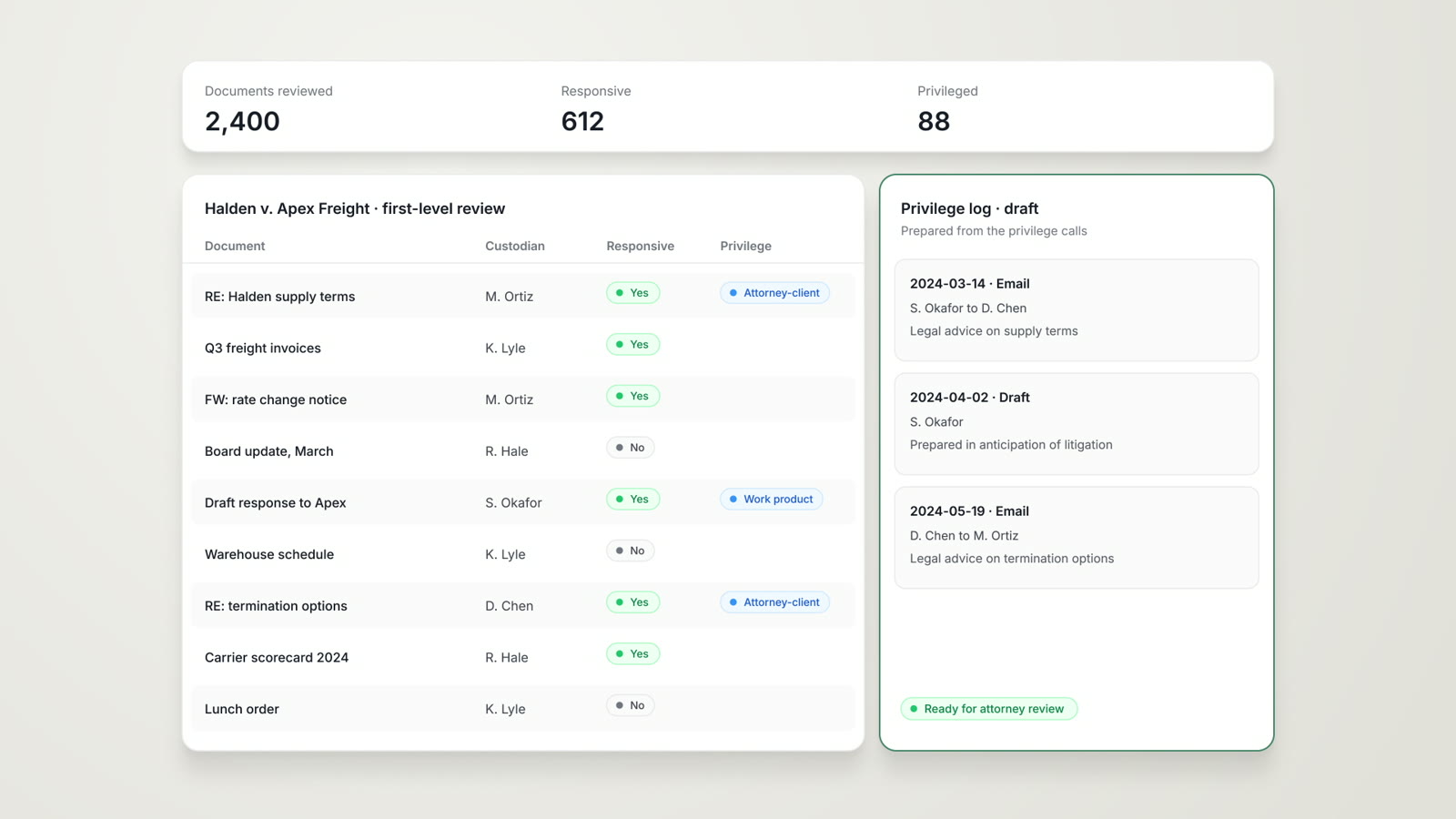
An associate runs first-level review on 2,400 documents
Halden Logistics supply dispute, a litigation matter.
What AtlasAI reads
 iManage
 SharePoint

 Halden Logistics supply dispute2,400 collected documentsResponsiveness and privilegeSam Okafor, Associate
You ask
Responsive and privilege tags on each document, with the basis cited, and a draft privilege log for attorney review
The associate asks
Sam Okafor asks AtlasAI to review the 2,400 collected Halden documents against the review protocol.
AtlasAI reads each document
AtlasAI reads each document against the responsiveness and privilege criteria of the protocol.
AtlasAI tags and drafts
AtlasAI tags each document with the basis cited, and drafts the privilege log from the privilege tags.
The attorneys decide
Sam Okafor reviews the privilege calls and the draft log, and Dana Chen approves the log before production.
What the attorney receives from a review
Each output cites the source documents, and each output is a draft for the review of the attorney.
| Output | What the output contains | Format |
|---|---|---|
| Review table | One row per document and one column per review question, with a citation in each cell | In AtlasAI, with XLSX export |
| Responsive and privilege tags | A tag for each document, with the basis and the passage cited | In the review table |
| Draft privilege log | An entry for each privileged document, with the date, the parties, the privilege basis and a description | XLSX or report |
| Comparison report | The substantive changes between two versions, with the section of each version cited | Report |
| Search results | The documents across iManage, SharePoint and OneDrive, with a cited answer | In AtlasAI, with the original document one click away |
A review the firm can account for
AtlasAI runs in your firm's Azure subscription or in the AtlasAI cloud, with the same controls in both. AtlasAI applies your firm's iManage permissions and ethical walls to every document and logs every question, answer and agent step. A self-hosted deployment streams the logs into your SIEM.
Under the Master Subscription Agreement, AtlasAI uses no customer data to train, fine-tune or improve any model, and zero data retention terms bind every approved model provider.
AtlasAI prepares the first-level calls, the privilege log and the comparison reports. Your attorneys review each call and approve each output before production.
From document collection to structured findings
Collect
Connect the document management system, uploads document sets or search across firm systems to build the review set.
Structure
Define the review questions and the extraction criteria, and AtlasAI creates a column for each data point.
Analyze
AtlasAI reads every document in the set, extracts the key terms and flags the issues across the full set.
Export
You download the structured results as XLSX, prepares reports or continue the conversation about the extracted data in AtlasAI Chat.
Built for the security review of a law firm
AtlasAI is preparing for a SOC 2 Type II audit by an independent CPA firm, and your security reviewers receive the current status under NDA. Under NDA, your security reviewers receive the AtlasAI Security and Compliance Posture Report and 12 corporate policies. Each deploying firm also receives the penetration test results.
Your deployment
Run AtlasAI in the AtlasAI cloud or in your firm’s Azure subscription, with the same controls in both.
Your permissions
AtlasAI agents read only the documents each user may open, with your iManage permissions and ethical walls applied to every step.
Your data
AtlasAI trains no model on your data, and every approved model provider works under zero data retention terms.
Your audit log
AtlasAI logs every question, answer and agent step. The managed service keeps the log for 365 days, with export, and a self-hosted deployment streams the log into your SIEM.
Related pages
Litigation
Discovery review, privilege flags, research on the assigned judge, deposition outlines and trial materials, each source cited.
Read more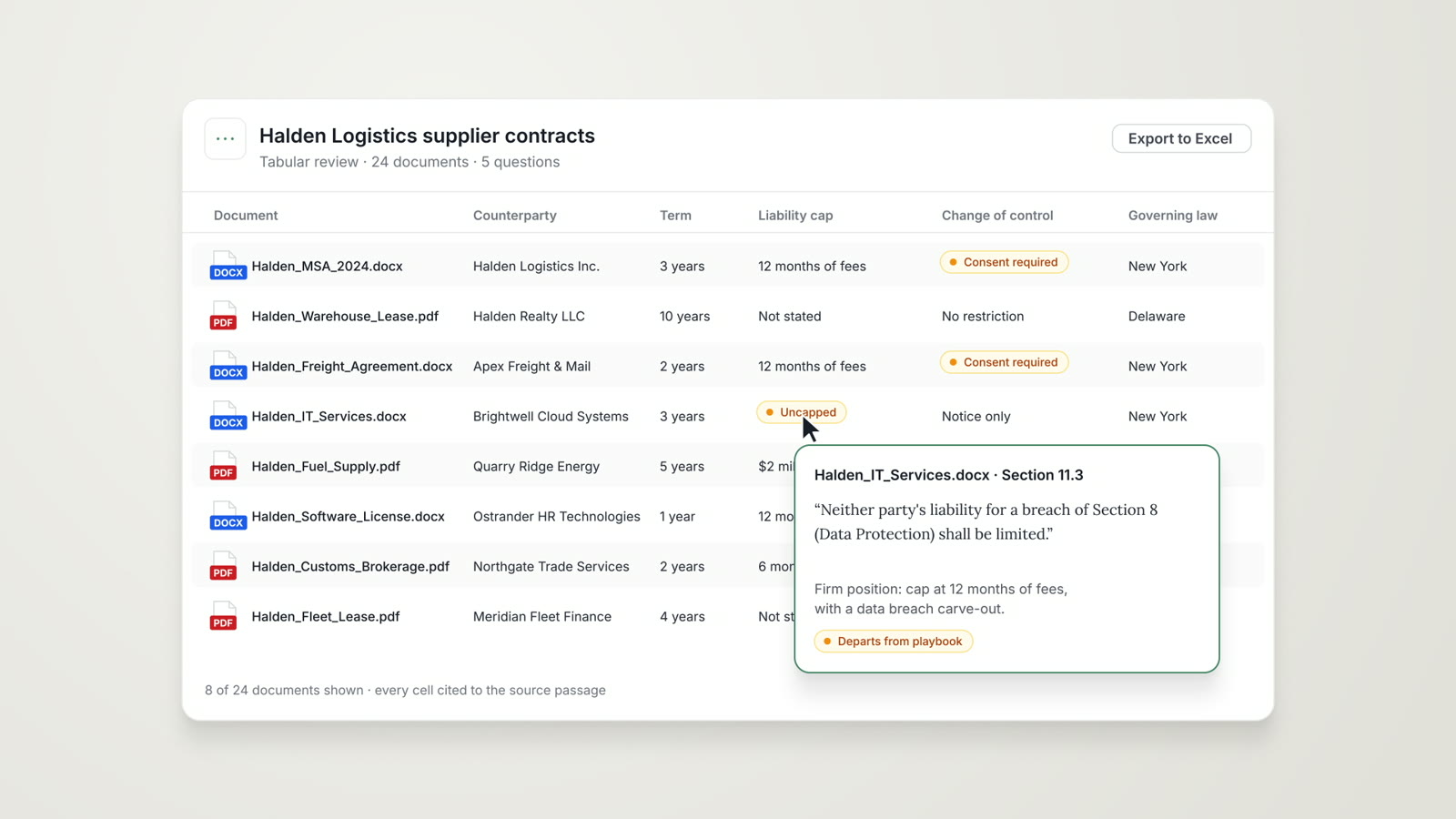
Tabular Review
The same questions across every document of a set, in one table with a citation in each cell.
Read more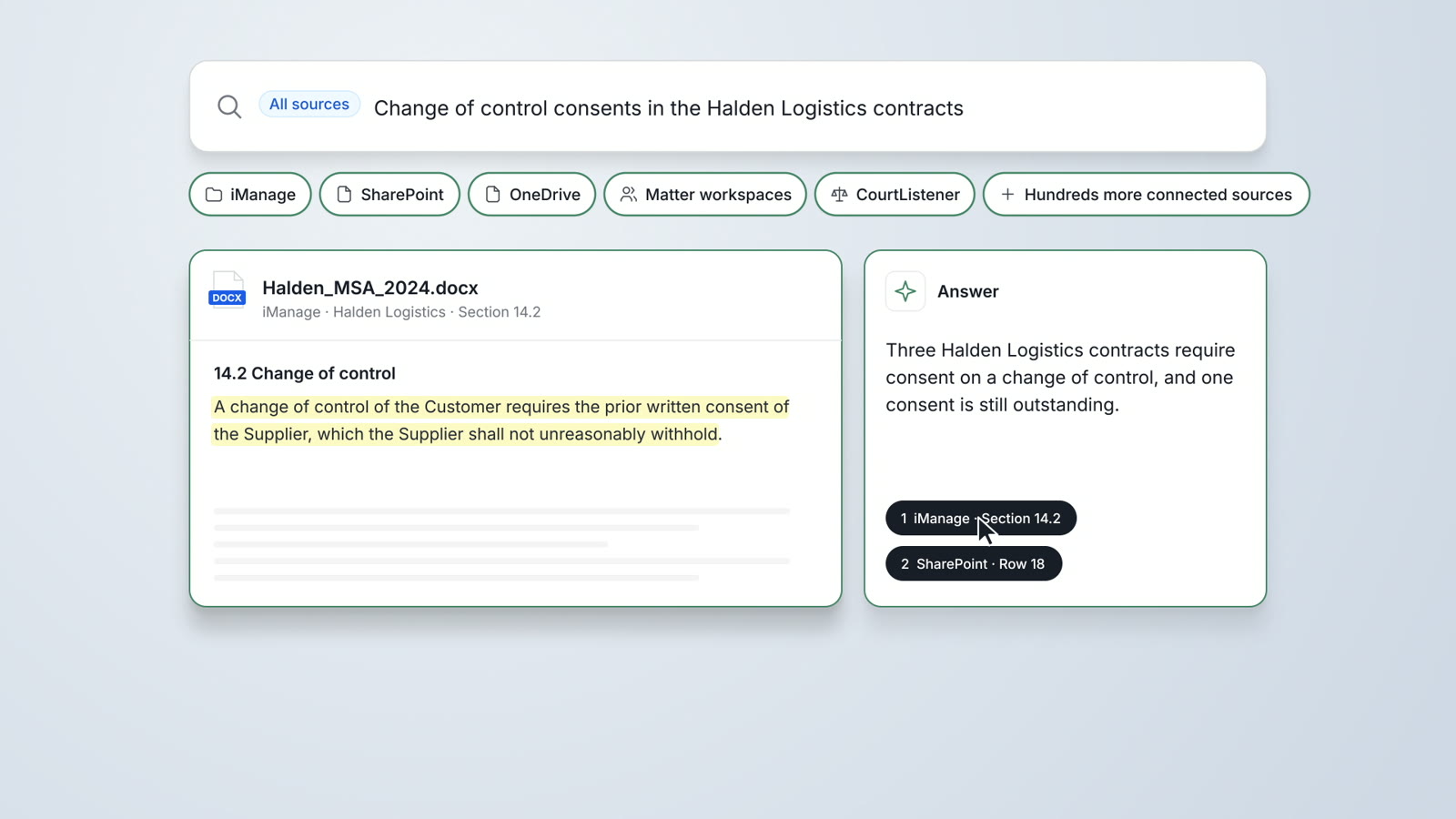
Enterprise Search
One search across iManage, SharePoint, OneDrive, matter workspaces and CourtListener, with a cited answer and the original document.
Read moreQuestions attorneys ask
What does AtlasAI do in eDiscovery?
AtlasAI runs first-level review against your review protocol and tags documents for responsiveness and privilege, with the basis cited. AtlasAI also drafts the privilege log, compares document versions and searches across your firm's systems.
How does the attorney check a tag?
Each tag cites the passage behind the tag. Open the passage from the review table and confirm or changes the call.
Does AtlasAI draft the privilege log?
Yes. AtlasAI drafts an entry for each privileged document from the privilege tags, and you review and approves each entry before production.
Which systems does AtlasAI search?
AtlasAI searches iManage, SharePoint, OneDrive and your firm's matter workspaces, together with uploaded document sets, with iManage permissions and the firm's document access rules applied. The iManage, SharePoint and NetDocuments connections are part of the Professional plan.
Can the firm export the results?
Yes. You download the review table as XLSX, exports reports and continue the analysis in AtlasAI Chat.
Is the review logged?
Yes. AtlasAI logs every question, answer and agent step. The managed service keeps the logs for 365 days with export, and a self-hosted deployment streams the logs into your SIEM.
Which plan includes AI eDiscovery?
Tabular Review and Agentic Workflows are part of the Professional plan at $99 per user per month, with a minimum of 5 users. Every plan starts with a 3-day free trial on one matter.