Legal AI that cites your matters
Legal AI ties every answer to a source a partner can audit, keeps privileged work product out of model training and operates inside the systems attorneys use.
3-day free trial on one matter. No setup fee.
AtlasAI is in use at firms like Fried Frank. Agents read the matters, positions and precedents of each firm, and attorneys decide.



Connected to the systems of the firm
AtlasAI reads documents, matters and positions from the systems the firm already runs, and applies the permissions of each system to every answer.
 iManage
Workspaces, folders and documents from iManage Work, with new versions saved back to the workspace.
 SharePoint
Sites and document libraries, indexed with the permissions of each library.

Workspaces and documents from NetDocuments, read with the access rights of each attorney.

Clients, matters and attorney assignments from Intapp, so every answer starts from the matter.
Grounded answers
Every answer tied to a verifiable source
Legal AI ties each answer to a source a partner can audit: case law, statutes, regulations or the documents of the firm. AtlasAI cites each statement to the source passage, and checks each case citation against the opinion in CourtListener before the answer reaches the attorney.
- A citation on each statementEach statement carries a citation to the document, the section and the passage, so the partner audits the answer against the source.
- Case law and SEC filingsAtlasAI verifies opinions in CourtListener and cites SEC filings from EDGAR.
- Firm precedentAtlasAI answers from the matters, accepted positions and signed precedents of the firm, with the matter of each passage stated.
Privacy by design
Privileged work product out of model training
Legal AI keeps privileged work product out of the training data of every model and deploys in a form the security and conflicts teams of the firm approve. AtlasAI runs in the Azure subscription of the firm or in the AtlasAI cloud, uses no customer data to train any model, and binds every approved model provider to zero data retention terms.
- DeploymentA self-hosted deployment in the Azure subscription of the firm involves no AtlasAI sub-processors, and the AtlasAI cloud uses a US region by default and an EU, UK or Canada region on Enterprise.
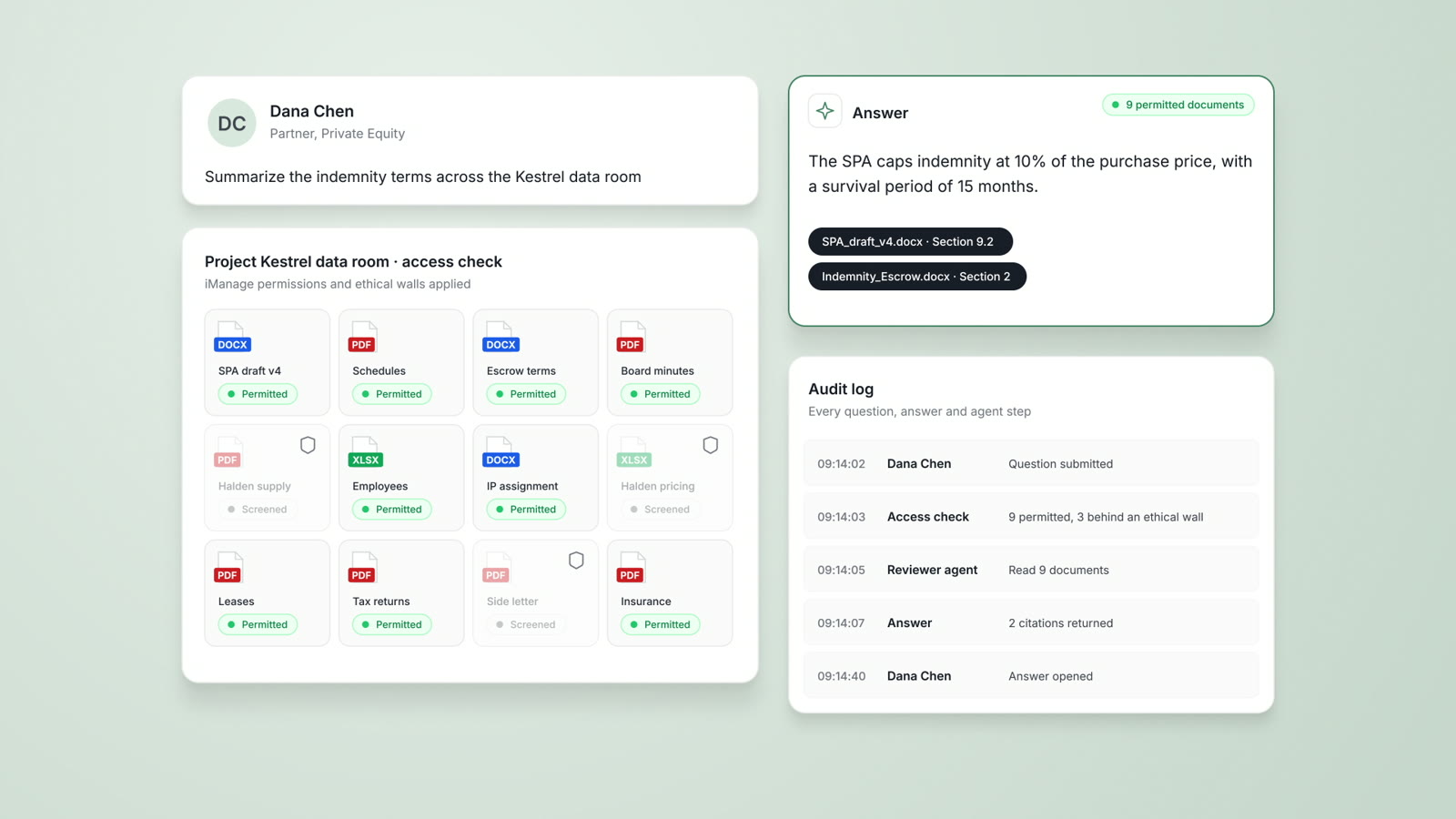
- PermissionsAtlasAI applies iManage permissions and ethical walls to every answer and every agent step.
- Contract termsAtlasAI offers a BAA on Enterprise and a standard DPA that covers GDPR and CCPA, with sub-processor disclosure.
Workflow fit
Legal AI inside the systems attorneys use
Legal AI handles the documents of legal work, such as contracts, pleadings, data rooms and research memos, and connects to the systems attorneys use every day. AtlasAI reads iManage, SharePoint, OneDrive and the matter workspaces, and the AtlasAI add-in brings the playbook review into Microsoft Word.
- No manual uploadAtlasAI reads documents from iManage, SharePoint and OneDrive with iManage permissions and the document access rules of the firm applied, so no workflow depends on a manual upload.
- Microsoft WordThe AtlasAI add-in compares a draft with the playbook of the firm in Word and inserts each change as a tracked change.
- Tables across documentsIn Tabular Review, AtlasAI answers the same questions across every document in a set, with a citation in each cell.
Agents
Agents that complete multi-step legal work
AtlasAI agents complete multi-step work from intake to output, such as diligence, contract review and research, and each workflow stops at an attorney checkpoint. The attorney reviews the output and decides, instead of driving every step.
- Built in chatThe attorney describes a workflow in chat, and AtlasAI builds the steps: intake, classification, review against the playbook, the attorney checkpoint and the output.
- Applied to a setThe firm applies a workflow to a set of documents, such as 36 supplier NDAs, and AtlasAI flags each departure from the NDA playbook.
- LoggedAtlasAI logs every agent step, and the iManage permissions of the firm apply to each agent step.
An associate checks 24 supplier contracts for change of control
Halden Logistics, an M&A matter.
Context AtlasAI reads
iManageSharePointSharePointThe attorney asks
A table of the 24 Halden supplier contracts with term, liability cap, change of control and governing law, each cell cited, and each contract that requires consent flagged
The associate asks
Maya Ortiz asks which of the 24 Halden supplier contracts require consent on a change of control.
AtlasAI reads every contract
AtlasAI reads each contract and fills a table with the term, the liability cap, the change of control clause and the governing law.
AtlasAI flags
AtlasAI flags each contract that requires consent, and each cell cites the clause in the source contract.
The associate checks
Maya Ortiz opens each flagged cell, reads the clause and adds the required consents to the closing checklist for Dana Chen.
Five workflows where legal AI delivers value
Legal AI delivers value where the volume of unstructured text slows the work of the attorney.
| Workflow | What legal AI does | In AtlasAI |
|---|---|---|
| Contract review and redlining | Extracts clauses, flags risks and finds departures from the playbook of the firm on the first-pass review | Playbook review in Word, with each change inserted as a tracked change |
| Due diligence | Reviews a full data room for change of control provisions, MAE clauses, IP assignments and employment golden parachutes across hundreds or thousands of documents | Tabular Review, and reviewer agents that prepare a diligence memo |
| Legal research | Answers multi-jurisdiction questions with citations and summarizes case law | Legal Research with opinions verified in CourtListener and filings from EDGAR |
| Drafting | Prepares first drafts of contracts, memos, briefs and correspondence from firm precedent, with the standard fallback positions of the firm | Drafts from the agreement of a closed matter, inside Microsoft Word |
| Knowledge management and enterprise search | Searches the document systems of the firm and returns the strongest precedent of the firm | Enterprise Search across iManage, SharePoint, OneDrive, matter workspaces and CourtListener |
What legal AI is
Legal AI is artificial intelligence built for legal work: research, contract review, document analysis, drafting, due diligence and case strategy. A general-purpose AI tool answers from public training data, while legal AI is grounded in legal sources and in the documents of the firm, and meets the accuracy, citation and privilege requirements of legal work.
The category grew in 2023, when GPT-4 made legal-grade products on large language models possible.
Three properties separate legal AI from generic AI. Grounding: answers tie to verifiable sources, such as case law, statutes, regulations or the documents of the firm, with citations a partner can audit. Privacy by design: privileged work product never enters the training data of a vendor, and the deployment meets the approval of the security and conflicts teams of the firm, with a private deployment, a BAA and no model training on firm inputs. Workflow fit: the platform handles contracts, pleadings, data rooms and research memos, and connects to the document management system and to Microsoft Word.
A firm evaluates every platform against all three properties before a pilot.
Four categories of legal AI platforms
The market for legal AI has consolidated into four categories, and the category of a platform indicates the strengths of the platform and the questions the firm asks before a purchase.
General-purpose legal AI platforms are cloud platforms that cover several workflows: drafting, review, research and analysis. The firm asks where the platform processes work product and whether answers draw on the documents of the firm.
Workflow-specific tools cover one workflow in depth, such as contract review in Word, contract analysis or due diligence. The firm asks how many separate tools the firm maintains, and whether the tools share the documents and positions of the firm.
Private legal AI platforms deploy inside the infrastructure of the firm: the Azure subscription, the data and the security perimeter of the firm. AtlasAI belongs to the private category: the knowledge graph grows on the documents of the firm, and the firm builds custom agents and workflows on the platform. A private deployment involves more setup than a cloud sign-up, and the pricing reflects an enterprise commitment.
Embedded legal AI adds AI features to legal software the firm already licenses, such as the word processor, the research service or the document management system. Embedded features add no new vendor to the security review, and cover only the workflows of the licensed software.
Category fit depends on the firm. A 30-attorney firm with every system in the cloud starts with a managed cloud service, such as the AtlasAI cloud. An AmLaw 100 firm with a CISO, in-house data science or the security expectations of a Magic Circle firm evaluates a private deployment in the Azure subscription of the firm.
Why a general-purpose chatbot is not legal AI
Firms often compare legal AI platforms with a general-purpose chatbot on price alone, and overlook invented citations, the lack of access to the matters of the firm and privilege risk.
Invented citations. Every major model can invent cases, holdings and statutes with confidence. In Mata v. Avianca (2023), a federal court sanctioned lawyers for citing cases a chatbot invented. Legal AI grounds every answer in a verifiable source, and AtlasAI checks each case citation against the opinion in CourtListener.
No access to the matters of the firm. A general chatbot drafts a generic indemnification clause, and cannot state the indemnification cap the firm accepted on technology M&A deals above $500 million last year. Legal AI answers from the matters and accepted positions of the firm.
Privilege risk. A consumer chatbot may use prompts for training under the terms of the provider, and an enterprise chatbot still processes documents on the servers of the provider under the terms of the provider. Many firm conflict and security policies prohibit either arrangement for privileged work.
Attorneys use general chatbots for low-stakes drafting, brainstorming and learning on non-privileged work. A general chatbot is not a substitute for a legal AI platform on client work.
Seven questions for the selection committee
The CKIO, the CISO and the practice leaders on the selection committee answer each question before a purchase.
1. Does the platform ground answers in real sources? Ask the vendor for a live answer with each citation opened to the source document.
2. Where does the platform process data? A cloud service, a vendor-managed cloud, the subscription of the firm and an air-gapped environment carry different privilege and conflicts implications, and the CISO of the firm reviews the choice before signature.
3. Does the platform read the document management system? A platform without a direct connection to iManage or SharePoint requires a manual upload in every workflow.
4. Does the platform use the documents of the firm? A platform without the documents of the firm returns the same answer to every firm. Ask the vendor for answers after the vendor indexes a large set of firm documents.
5. Can the firm build on the platform? Use cases off the shelf are available to every firm on the platform, and a firm builds custom workflows from the practice of the firm. Ask whether the firm builds agents, playbooks and integrations directly, or waits for the roadmap of the vendor.
6. What does adoption look like at similar firms? Request reference calls, and ask the head of innovation at each reference firm what share of attorneys use the platform each week after six months.
7. What is the total cost of ownership? Count per-seat licenses, training, change management, integration and consulting hours, and build a three-year model before signature.
Four ethics questions for legal AI
State bars now address four ethics questions on legal AI, and each firm answers the four questions before deployment.
Attorney-client privilege. When a vendor processes work product on cloud servers, the firm reviews whether the vendor agreement preserves privilege. A deployment inside the infrastructure of the firm, such as AtlasAI in the Azure subscription of the firm, keeps work product inside the perimeter of the firm.
Conflicts of interest. A foundation model trained on inputs from several firms creates a theoretical risk that the prompts of opposing counsel influence the answers the firm receives. The firm confirms in the contract that the platform trains no model on firm inputs; under the Master Subscription Agreement, AtlasAI uses no customer data to train, fine-tune or improve any model.
Competence under ABA Model Rule 1.1. Lawyers have a duty to understand the technology the lawyers use: what the tool does, the source of the data and the ways the tool can fail. Competence requires training, in addition to deployment.
Hallucinations and accuracy. The Mata v. Avianca sanctions in 2023 established that filing AI-generated work without verification is sanctionable. Every AI output is a draft for attorney review, and a platform that cites each source makes the review practical.
Why some firms see value and some firms do not
Firms that see no return from legal AI fall into three patterns: the firm bought a platform without integration with the document management system, the firm did not train attorneys, or the firm treated AI as a cost-cutting tool instead of a means to complete more work per attorney.
A firm avoids the three patterns when the firm connects the document management system before the pilot, trains each attorney in the pilot group and tracks weekly use by practice group.
Where legal AI is going
Agents in place of tools. Many AI workflows still require an attorney at every step. Multi-step agents now complete diligence, contract review and research workflows from intake to output, and attorneys review the outputs instead of driving every step; AtlasAI agentic workflows operate on the agent model today.
Private deployment as a requirement. The largest firms keep privileged work product inside the security perimeter of the firm, and AtlasAI expects private deployment to become a requirement for the largest firms.
Knowledge graphs of firm precedent. A knowledge graph connects the matters, accepted positions and signed precedents of a firm, and attorneys start each draft from the signed agreement of a closed matter. AtlasAI expects the largest firms to build a knowledge graph on the documents of the firm before the firm deploys agents.
A 90-day rollout plan
Days 1 to 30: foundation
Complete the security and conflicts review in parallel with procurement, connect iManage and SharePoint and index the documents, start a pilot with 10 to 20 power users across 2 or 3 practice groups, and identify the three workflows of highest value to the firm.
Days 31 to 60: calibration
Build the playbooks of the firm from the pilot patterns, tune the knowledge graph against firm precedent, set the governance for who deploys custom workflows and who reviews each workflow, and expand the pilot to 100 to 200 attorneys.
Days 61 to 90: firm-wide rollout
Roll out AtlasAI across the firm with mandatory training, track adoption by practice group, by partner and by workflow, and hold weekly innovation reviews and monthly sessions where practice groups share use cases.
After day 90: custom solutions
Build custom agents and workflows on the platform for the practice groups of the firm, with an attorney checkpoint in each workflow.
Built for the security review of a law firm
AtlasAI runs the security program on the SOC 2 Trust Services Criteria, and the AtlasAI security team shares the current audit status and the control documentation with the security reviewers of each firm. Under NDA, the AtlasAI security team provides the Security and Compliance Posture Report and 12 corporate policies to the security reviewers of each firm, and shares the penetration test results with each deploying firm.
Your deployment
AtlasAI runs in the AtlasAI cloud or in the Azure subscription of the firm, with the same controls in both.
Your permissions
Agents read only the documents each user may open, with iManage permissions and ethical walls applied to every step.
Your data
AtlasAI trains no model on firm data, and approved model providers work under zero data retention terms.
Your audit log
AtlasAI logs every question, answer and agent step. The managed service keeps the log for 365 days with customer export, and a self-hosted deployment streams the log into the SIEM of the firm.
Related pages
Private legal AI
One knowledge graph from iManage and SharePoint, deployed in the Azure subscription of the firm or the AtlasAI cloud.
Read more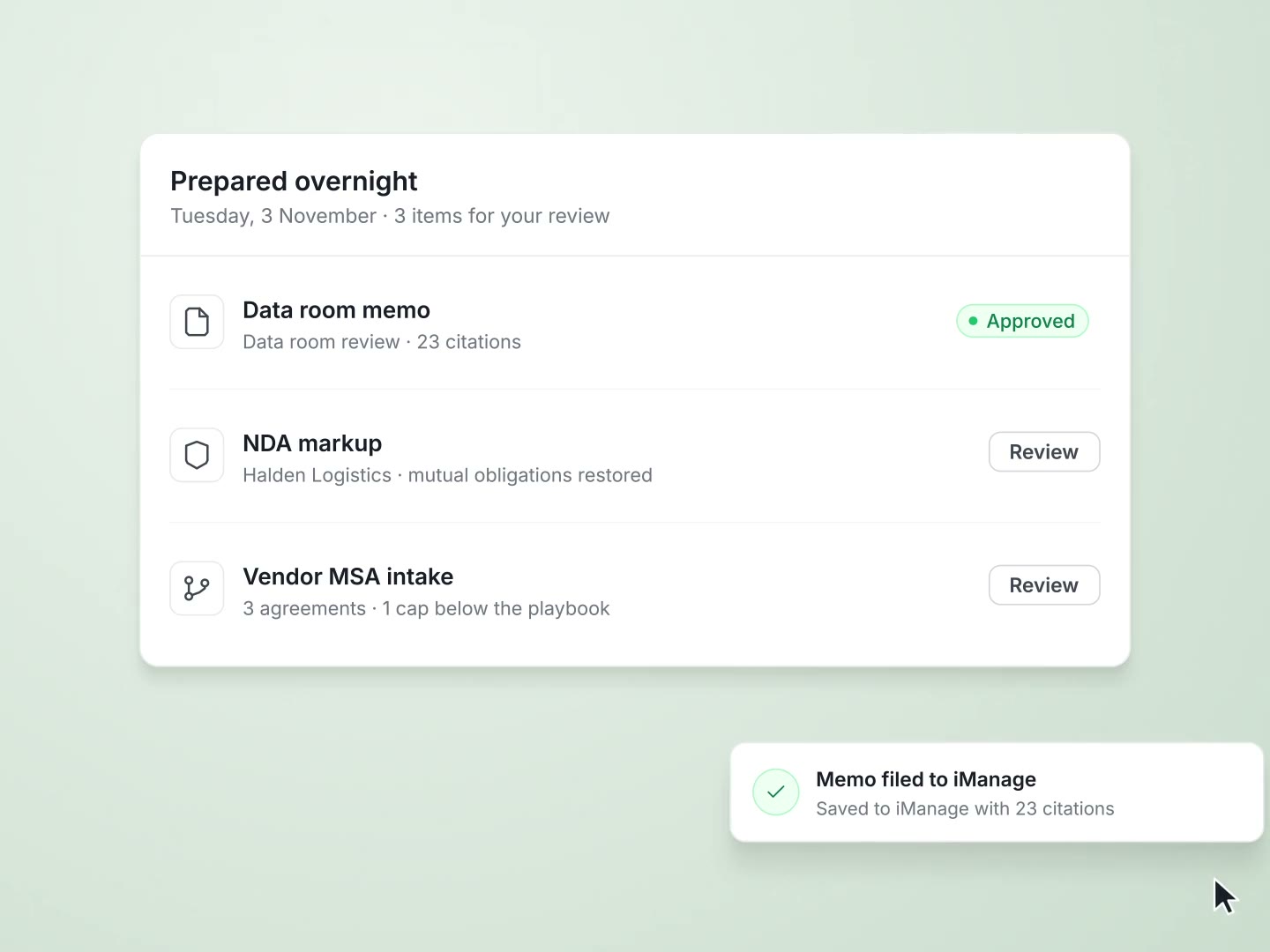
AI for lawyers
Cited answers from firm precedent, document analysis, verified legal research and one search across the systems of the firm.
Read moreSecurity and trust
Deployment in the AtlasAI cloud or the Azure subscription of the firm, iManage walls on every answer, and a log of every agent step.
Read moreQuestions attorneys ask
What is legal AI?
Legal AI is artificial intelligence built for legal work: contract review, document analysis, legal research, drafting and case strategy. Legal AI is grounded in legal sources and in the documents of the firm, and meets the privilege, accuracy and citation requirements of legal work.
How does legal AI differ from a general-purpose chatbot?
A general-purpose chatbot can invent citations, has no access to the documents of the firm and may process prompts on the servers of the provider. Legal AI grounds each answer in legal sources or firm documents, with audit logs and security controls.
How does a firm choose a legal AI platform?
A firm starts with category fit and the seven evaluation questions: grounding in sources, where data is processed, the connection to the document management system, use of firm documents, the ability to build on the platform, adoption at similar firms and total cost. AtlasAI serves firms with strict data governance, with deployment in the Azure subscription of the firm and a knowledge graph on the documents of the firm.
Is legal AI safe for privileged work?
Privilege depends on where the platform processes work product and on the contract terms. AtlasAI runs in the Azure subscription of the firm or in the AtlasAI cloud, uses no customer data to train any model, and applies iManage permissions and ethical walls to every answer.
How long does a rollout of legal AI take?
A firm-wide rollout with training and adoption tracking follows a plan of about 90 days: foundation, calibration and firm-wide rollout. A firm starts AtlasAI with a 3-day free trial on one matter, with no setup fee.
What does AtlasAI cost?
Starter costs $25 per user per month, Professional costs $99 per user per month with a minimum of 5 users, and Enterprise pricing comes from AtlasAI sales. Professional adds the knowledge graph, Tabular Review and Legal Research with CourtListener and EDGAR, and Enterprise adds the iManage and SharePoint connections, single sign-on, Playbooks, AI Assistants, Agentic Workflows, Data Analysis and dedicated support. Every plan starts with a 3-day free trial on one matter.
Can legal AI replace lawyers?
No. Legal AI prepares the work, and every output requires the review and judgment of an attorney. AtlasAI stops each workflow at an attorney checkpoint and cites each statement for the review.
Does AtlasAI train models on firm data?
No. Under the Master Subscription Agreement, AtlasAI uses no customer data to train, fine-tune or improve any model, and zero data retention terms bind every approved model provider, with inference in region.