Private legal AI inside your infrastructure
AtlasAI connects your firm's work product in iManage and SharePoint into one knowledge graph, deployed in your firm's Azure subscription or in the AtlasAI cloud. Every answer cites the source passage, and AtlasAI trains no model on firm data.
3-day free trial on one matter. No setup fee.
Attorneys draft, review and research with AtlasAI, starting from their best past work.


Connected to the systems your firm already uses
AtlasAI reads documents, matters and positions from the systems your firm already uses, and applies each system’s permissions to every answer.
 iManage
Workspaces, folders and documents from iManage Work, with new versions saved back to the workspace.
 SharePoint
Sites and document libraries, indexed with each library's permissions.

Workspaces and documents from NetDocuments, read with each attorney's access rights.

Clients, matters and attorney assignments from Intapp, so every answer starts from the matter.
Firm knowledge
Answers grounded in your firm's documents
AtlasAI builds a private knowledge graph from your firm's documents, precedents, matters and past positions. Each answer cites your firm's sources, and no answer draws on the public internet.
- Matters and positionsThe graph connects each matter with the clauses, the accepted positions and the signed precedents of the matter.
- Historical questionsAn attorney asks how the firm structured earnout provisions in healthcare M&A, and AtlasAI answers from the firm's signed agreements.
- Private to the firmThe knowledge graph and your firm's vector embeddings are partitioned from every other firm.
Connected systems
Connected to iManage and SharePoint through your SSO
On Professional and Enterprise, AtlasAI connects to iManage under the existing iManage access rights, and to SharePoint, OneDrive and your firm's matter workspaces through your firm's single sign-on. Attorneys search, open and analyze documents from the document management system, with iManage permissions and your firm's document access rules applied.
- iManage workspacesAn attorney searches the iManage workspace for every precedent on data privacy clauses, and AtlasAI returns the clauses with the matter of each clause.
- Single sign-onOn every plan, attorneys sign in with Microsoft or Google. On Enterprise, attorneys sign in through SAML or OIDC single sign-on with Microsoft Entra ID or Okta, and MFA.
- Permissions of each systemAtlasAI applies your firm's iManage permissions and ethical walls to every answer and agent step.
Cited answers
Every answer links back to the source
AtlasAI cites each statement of an answer to the passage in the source document. You click a citation and open the passage in the source document, with the language highlighted.
- The source in one clickAn attorney asks for the source of a limitation of liability clause, and AtlasAI opens the clause in the signed agreement.
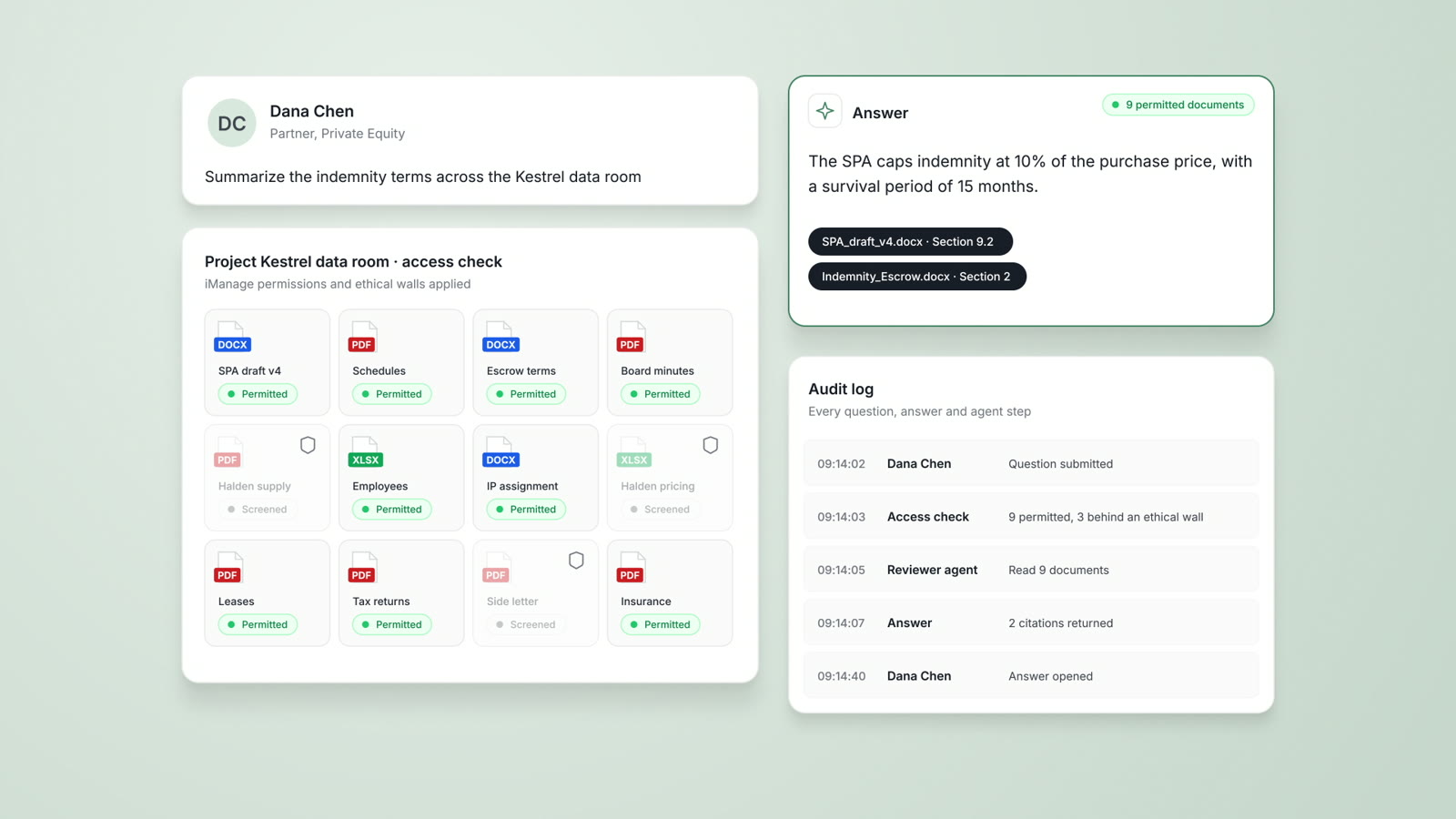
- Permitted documents onlyEach user receives answers only from the documents the user may open.
- Logged for reviewAtlasAI logs every question, answer and agent step for your firm's security team.
Deployment
Your Azure subscription or the AtlasAI cloud
The firm deploys AtlasAI in your firm's Azure subscription, in any Azure region, or uses the AtlasAI cloud, with the same controls in both deployments. A self-hosted deployment involves no AtlasAI sub-processors, and every log streams into your firm's SIEM.
- The AtlasAI cloudThe managed service uses a US region by default and an EU, UK or Canada region on Enterprise.
- No trainingUnder the Master Subscription Agreement, AtlasAI uses no customer data to train, fine-tune or improve any model.
- Encryption and keysAtlasAI encrypts data with AES-256 at rest and TLS 1.2 or higher in transit, with customer-managed keys on Enterprise and in self-hosted deployments.
A partner asks how the firm structured earnouts
Project Loom, a private equity M&A matter.
What AtlasAI reads
iManageSharePointProject LoomiManageBrightwell Holdings SPA, signediManage, Private Equity workspacesDana Chen, Partner, Private EquityYou ask
The earnout structures from the firm's healthcare acquisitions, with the matter, the clause and the signed agreement cited for each structure
The partner asks
Dana Chen asks how the firm structured earnout provisions in prior healthcare acquisitions, for the Project Loom term sheet.
AtlasAI searches iManage
AtlasAI searches the Private Equity workspaces in iManage that Dana Chen may open, and reads the signed agreements and the earnout memo.
AtlasAI answers
The answer compares the earnout structures, with the period, the metric and the cap of each structure cited to the signed agreement.
The partner decides
Dana Chen opens Section 2.6 of the Brightwell agreement and selects the earnout structure for the Loom term sheet.
The risks a firm evaluates before AI reads client documents
A firm evaluates four risks in any AI deployment. The table states the question the firm asks and the AtlasAI answer.
| Risk | The question the firm asks | The AtlasAI answer |
|---|---|---|
| Data exposure | Where does the platform process client data? | In your firm's Azure subscription or in the AtlasAI cloud, in the region the firm selects |
| Shared models | Can the data of one firm reach another firm? | Zero data retention terms bind every model provider, no model state persists between requests, and each firm's knowledge graph and embeddings are partitioned |
| Privilege risk | Does work product leave your firm's perimeter? | A self-hosted deployment keeps work product in your firm's Azure subscription, with no AtlasAI sub-processors |
| Compliance gaps | Does the platform fit your firm's compliance program? | Security program on the SOC 2 Trust Services Criteria, with the audit status shared under NDA; control set mapped to HITRUST CSF e1; standard DPA for GDPR and CCPA |
Private deployment applies the controls your firm already has
A self-hosted deployment of AtlasAI operates inside your firm's Azure subscription. Your firm's retention rules, DLP policies, conditional access and network segmentation apply to AtlasAI without change, and your security team defends no new perimeter.
The firm holds the encryption keys. With customer-managed keys, the firm rotates the root keys and may revoke AtlasAI access at any time, and every log of the deployment streams into the firm's SIEM.
A firm that prefers a managed service uses the AtlasAI cloud with the same controls. The cloud has the same encryption and audit logging, zero data retention terms with every approved model provider, and inference in the data's region.
AtlasAI is preparing for a SOC 2 Type II audit by an independent CPA firm, and your security reviewers receive the current status under NDA.
How a private deployment starts
Review the architecture
Your security team reviews the architecture with an AtlasAI engineer. The review covers where each document is stored, which users may open each document, and how each log entry reaches your SIEM.
Deploy from templates
AtlasAI deploys from templates into a resource group your firm designates, in any Azure region of your subscription. Or AtlasAI provisions the AtlasAI cloud in a US, EU, UK or Canada region.
Connect the document systems
On Professional and Enterprise, the firm connects iManage under the existing iManage access rights, and SharePoint, OneDrive and the matter workspaces through the firm's single sign-on.
Build the knowledge graph
AtlasAI reads the permitted documents and connects matters, clauses, accepted positions and precedents in your firm's knowledge graph.
Built for the security review of a law firm
AtlasAI is preparing for a SOC 2 Type II audit by an independent CPA firm, and your security reviewers receive the current status under NDA. Under NDA, your security reviewers receive the AtlasAI Security and Compliance Posture Report and 12 corporate policies. Each deploying firm also receives the penetration test results.
Your deployment
Run AtlasAI in the AtlasAI cloud or in your firm’s Azure subscription, with the same controls in both.
Your permissions
AtlasAI agents read only the documents each user may open, with your iManage permissions and ethical walls applied to every step.
Your data
AtlasAI trains no model on your data, and every approved model provider works under zero data retention terms.
Your audit log
AtlasAI logs every question, answer and agent step. The managed service keeps the log for 365 days, with export, and a self-hosted deployment streams the log into your SIEM.
Related capabilities
Security and trust
Deployment in the AtlasAI cloud or your firm's Azure subscription, iManage walls on every answer, and a log of every agent step.
Read more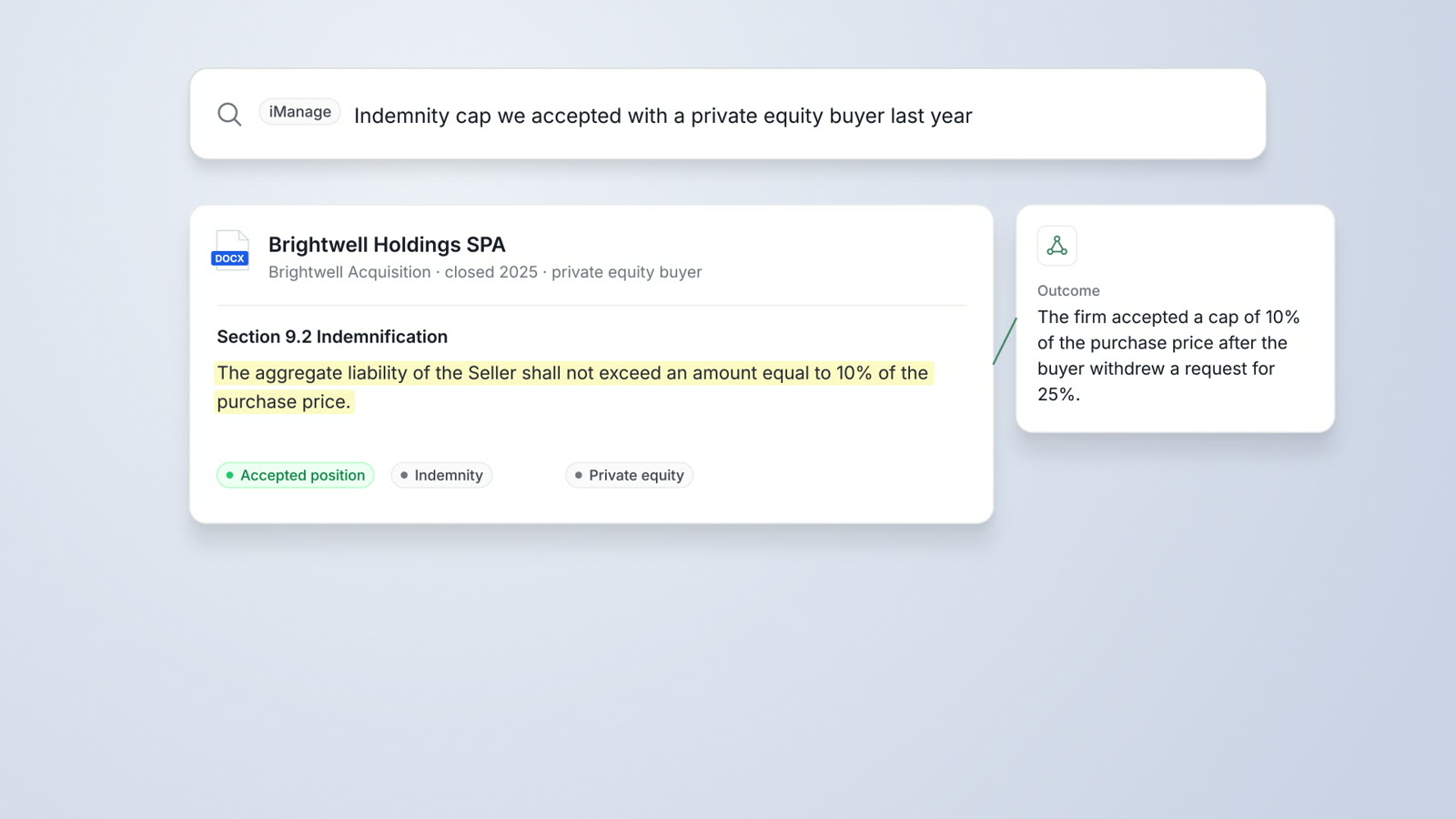
DMS Integration
iManage Work, SharePoint and OneDrive connected, with iManage permissions and ethical walls applied and results saved back.
Read more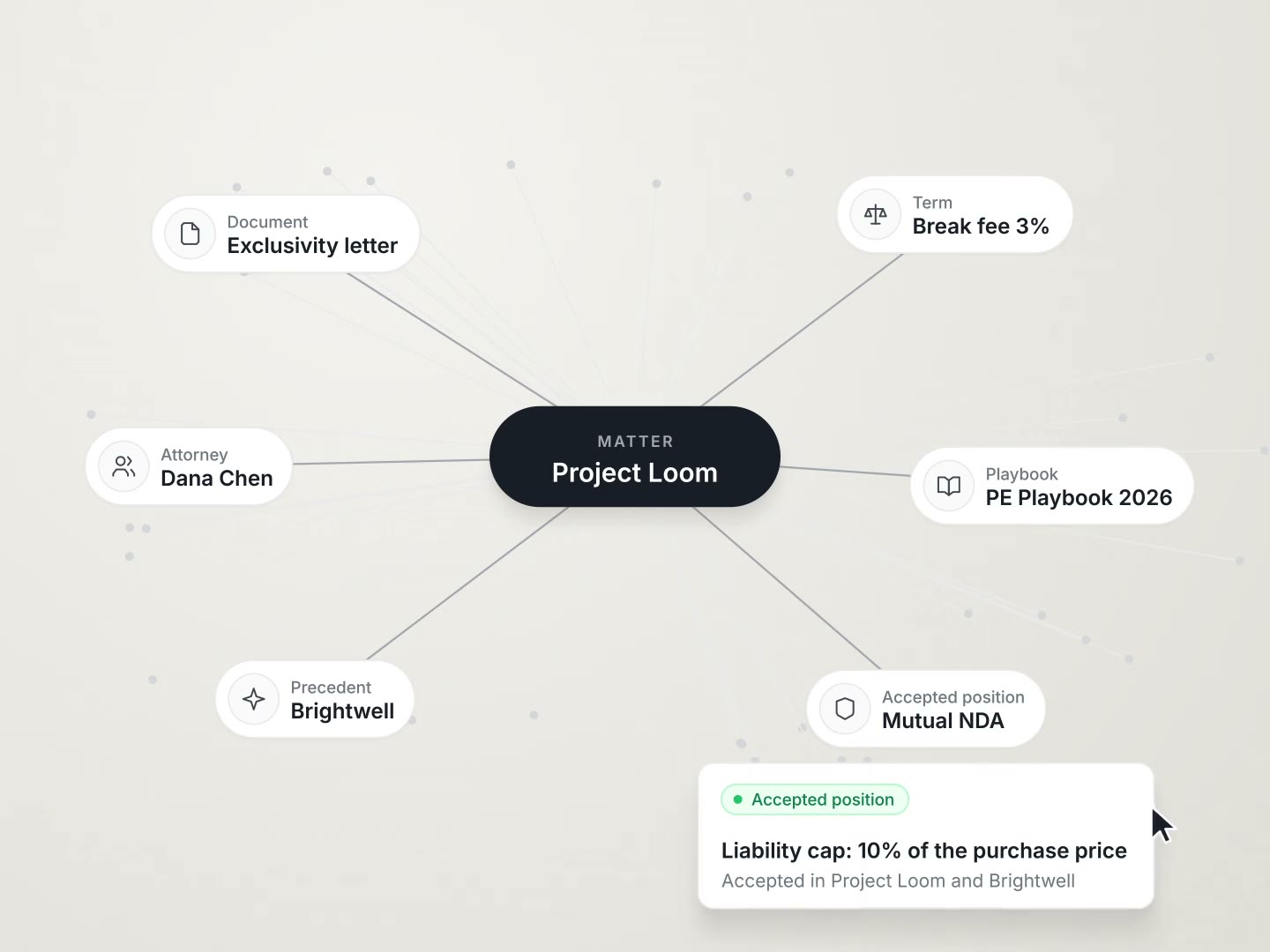
Knowledge Graph
Your firm's matters, parties, clauses, obligations and defined terms in one graph, cited in every answer.
Read moreQuestions attorneys ask
What is private legal AI?
Private legal AI is legal AI deployed under your firm's controls, with answers drawn from the firm's documents. AtlasAI runs in your firm's Azure subscription or in the AtlasAI cloud, with the same controls in both deployments.
Does any data leave our Azure subscription?
No. In a self-hosted deployment, documents, prompts, answers and logs stay in your firm's Azure subscription. Model inference uses an enterprise model endpoint in the subscription or a private model endpoint your firm operates, and the deployment uses no AtlasAI sub-processors.
Which systems does AtlasAI connect to?
AtlasAI connects to iManage, SharePoint, NetDocuments, OneDrive and your matter workspaces, to CourtListener for case law and EDGAR for SEC filings, and to Microsoft Word through the AtlasAI add-in. The document system integrations are part of the Professional plan.
Does AtlasAI train models on our documents?
No. Under the Master Subscription Agreement, AtlasAI uses no customer data to train, fine-tune or improve any model. Every approved model provider works under zero data retention terms, with inference in region.
How do attorneys sign in?
On every plan, attorneys sign in with Microsoft or Google. On Enterprise, attorneys sign in through SAML or OIDC single sign-on with Microsoft Entra ID or Okta, and MFA, and a self-hosted deployment applies your firm's conditional access policies unchanged.
Who controls the encryption keys?
AtlasAI encrypts data with AES-256 at rest and TLS 1.2 or higher in transit. Customer-managed keys are available on Enterprise and in self-hosted deployments, and the firm rotates the keys or revokes AtlasAI access at any time.
How does a firm start?
Every plan starts with a 3-day free trial on one matter in the AtlasAI cloud, with no setup fee and no commitment. Before a deployment in your firm's Azure subscription, your security team reviews the architecture with an AtlasAI engineer. Your firm then plans a pilot with 10 to 20 attorneys across 2 or 3 practice groups, and the knowledge graph is part of the Professional plan.