AI playbooks, applied to every draft
Every attorney drafts to your firm's standard. Your knowledge team captures each practice group's approved positions, preferred language and fallbacks in AtlasAI Playbooks. AtlasAI checks every document against the assigned playbook and flags each departure with the approved fix.
3-day free trial on one matter. No setup fee.
Attorneys draft, review and research with AtlasAI, starting from their best past work.



A partner builds the Vendor MSA playbook from eight signed MSAs
Q1 Vendor MSA Review, a commercial contracts matter for the portfolio companies of a sponsor client.
What AtlasAI reads
 iManage
 SharePoint

 Q1 Vendor MSA ReviewEight signed vendor MSAsSharePointLiability cap at 12 months of feesDana Chen, Partner, Private Equity
You ask
Draft entries for limitation of liability, data protection and termination, each with the approved position, the fallback and the clause of each signed MSA cited
The partner asks
Dana Chen asks AtlasAI to draft Vendor MSA playbook entries from the eight signed MSAs of the Q1 Vendor MSA Review.
AtlasAI reads the MSAs
AtlasAI reads the limitation of liability, data protection and termination clauses of the eight MSAs.
AtlasAI drafts the entries
AtlasAI drafts each entry with the approved position and the fallback, and cites the clause of each signed MSA.
The partner publishes
Dana Chen sets the cap entry at 12 months of fees and publishes the playbook to the Private Equity group for the vendor contracts of portfolio companies.
Standards enforcement
Your standards applied to every document
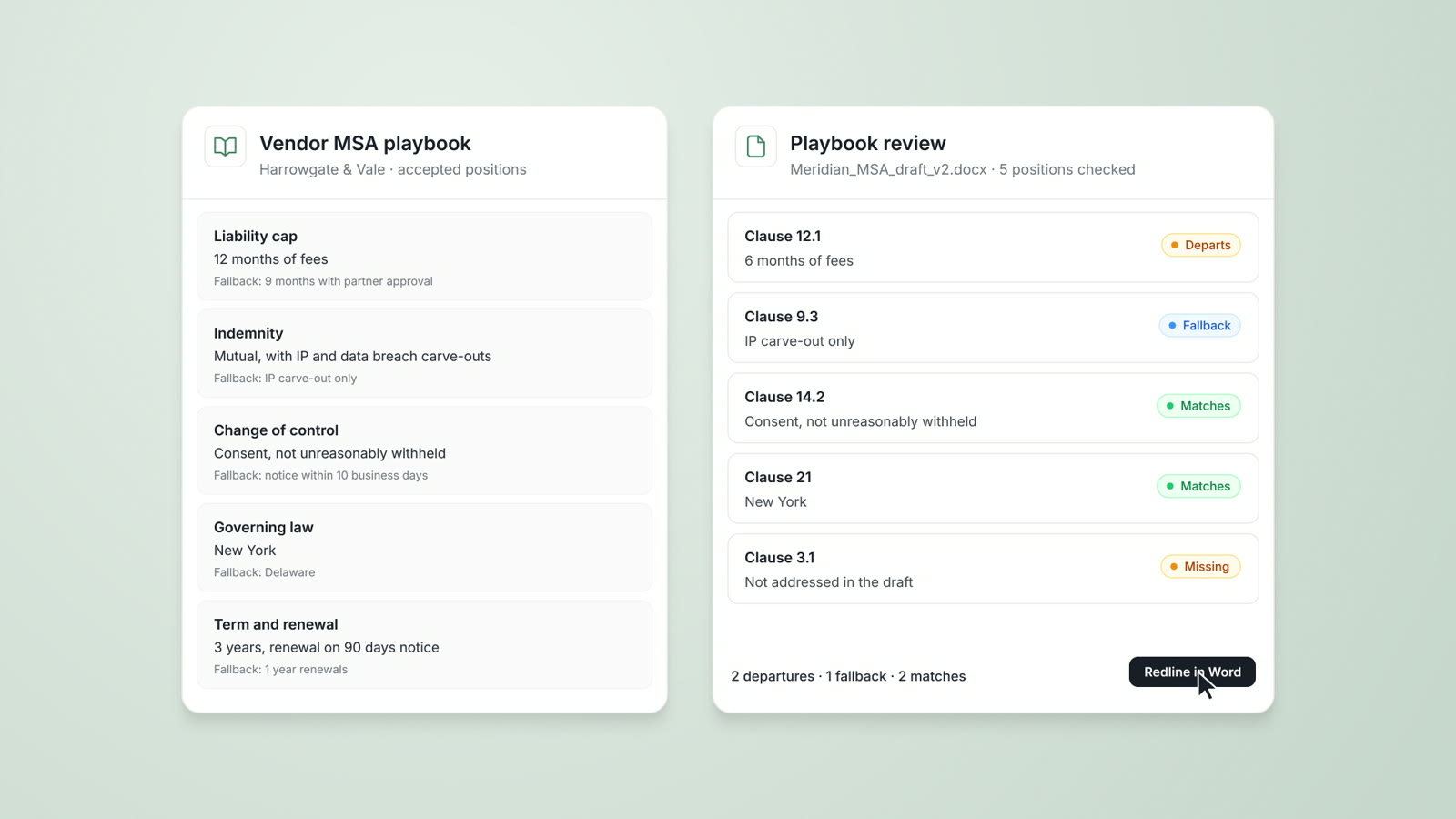
AtlasAI checks every document against your approved positions, preferred language and required clauses. Each departure comes with a suggested correction, and the AtlasAI add-in inserts the correction into Word as a tracked change.
- A playbook reviewAsk AtlasAI to check a lease agreement against your firm's commercial real estate playbook.
- Four resultsAtlasAI marks each clause as matching, departing, at the fallback position or missing.
- ConsistencyEvery attorney on every matter works to the same standard from the same playbook.
Custom playbooks
Playbooks built from your firm's expertise
Build playbooks from your firm's best precedents, your partners' preferences and each practice group's standards. Each playbook entry holds the approved position, the fallback language and the point at which an attorney escalates.
- From precedentAsk AtlasAI to draft a technology licensing playbook from your firm's signed licensing agreements, for partner review.
- Partner preferencesAdd each partner's and each client's preferences beside the standard position.
- Escalation triggersEach entry states when an attorney escalates a clause to the partner, such as an uncapped liability clause.
Assignment
The right playbook for each practice group
Assign each playbook to practice groups, matter types or individual attorneys. AtlasAI applies the assigned playbook to each document in the matter, and your knowledge team updates the playbook in one place.
- Practice groupsYour Private Equity group applies the Private Equity M&A playbook to every purchase agreement.
- Matter typesEvery vendor MSA gets the Vendor MSA playbook review.
- The firm libraryYour knowledge team publishes playbooks and assistants in one firm library.
Review at volume
One playbook applied to a full set
AtlasAI agents apply a playbook to a full set of documents, such as 36 supplier NDAs, and flag each departure in each document. You review the flags at a checkpoint before any work goes to the client.
- Workflows built in chatDescribe the review in chat, and AtlasAI builds the steps: intake, classification, playbook review, your checkpoint and the output.
- A flag in each documentEach flag cites the playbook entry and the clause in the document.
- LoggedAtlasAI logs every agent step of the review.
What each playbook entry contains
Each playbook entry has six parts, and AtlasAI applies all six to each clause.
| Element | What the element contains | Example from the Vendor MSA playbook |
|---|---|---|
| Approved position | The position your firm takes | Liability cap at 12 months of fees |
| Preferred language | The clause text your firm prefers | Your firm's limitation of liability clause |
| Fallback position | The position your firm accepts when the counterparty rejects the approved position | A lower cap with a carve-out for data breach |
| Required clause | A clause every agreement of this type must include | A data protection clause |
| Escalation trigger | The term that requires partner review | Uncapped liability |
| Commentary | The reason for the position and guidance for the negotiation | The reasons your firm gives the counterparty for the cap |
From firm knowledge to applied standards
Define standards
Identify the approved positions, preferred language and required provisions for each practice area.
Build the playbook
Organize the standards into playbooks with fallback positions, escalation points and commentary.
Assign to practice groups
Assign each playbook to practice groups, matter types or individual attorneys.
Apply to every document
AtlasAI checks every document against the assigned playbook and flags each departure with a suggested correction.
Built for the security review of a law firm
AtlasAI runs the security program on the SOC 2 Trust Services Criteria, and the AtlasAI security team shares the current audit status and the control documentation with your security reviewers. Under NDA, your security reviewers receive the AtlasAI Security and Compliance Posture Report and 12 corporate policies. Each deploying firm also receives the penetration test results.
Your deployment
Run AtlasAI in the AtlasAI cloud or in your firm’s Azure subscription, with the same controls in both.
Your permissions
AtlasAI agents read only the documents each user may open, with your iManage permissions and ethical walls applied to every step.
Your data
AtlasAI trains no model on your data, and every approved model provider works under zero data retention terms.
Your audit log
AtlasAI logs every question, answer and agent step. The managed service keeps the log for 365 days, with export, and a self-hosted deployment streams the log into your SIEM.
Related capabilities
AI contract review
Contract review against your firm's playbooks and past positions, with tracked changes in Word and a citation on every flag.
Read more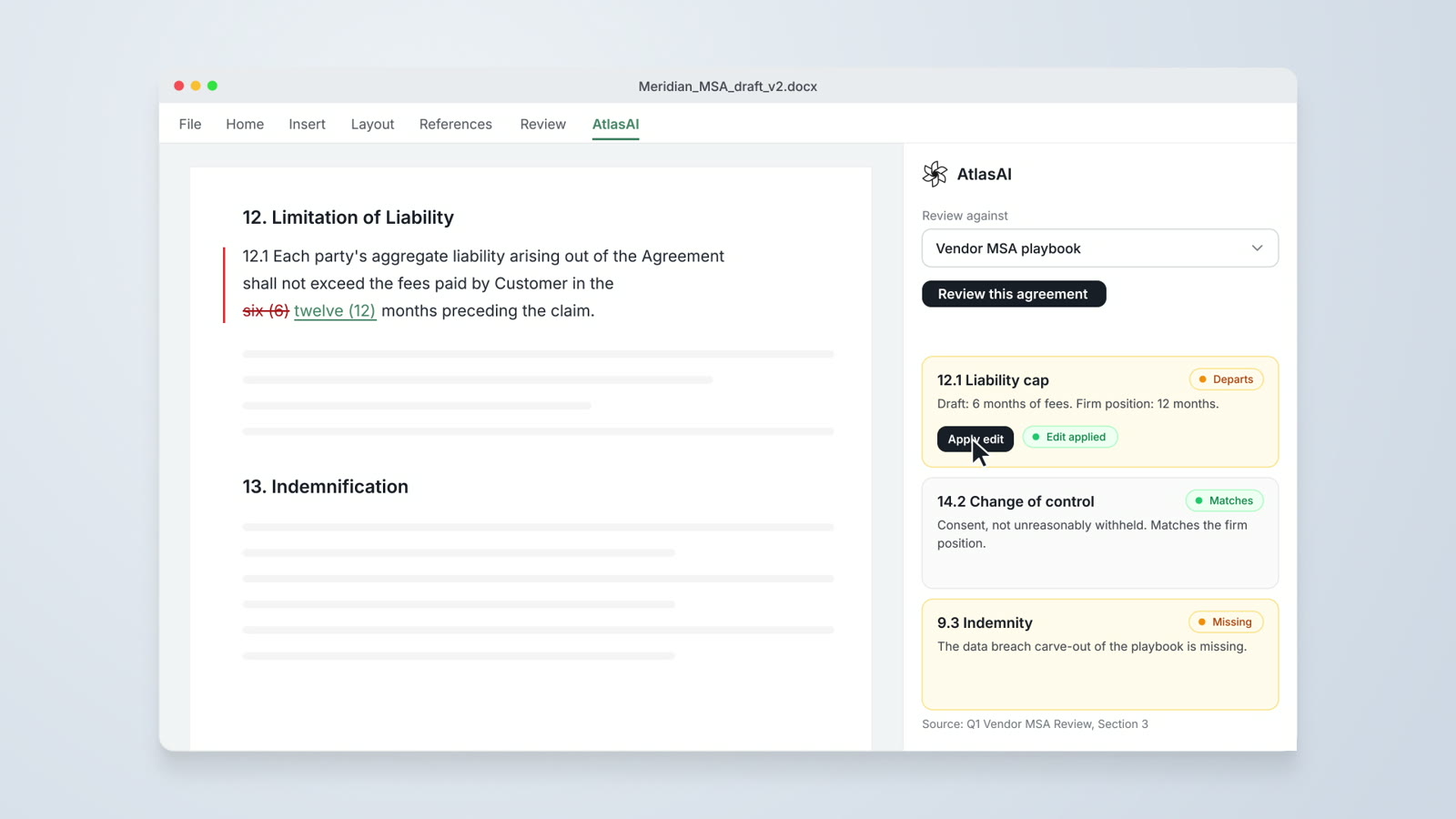
AtlasAI for Word
Drafting from precedent, redlines against preferred language and playbook checks, inside Microsoft Word.
Read more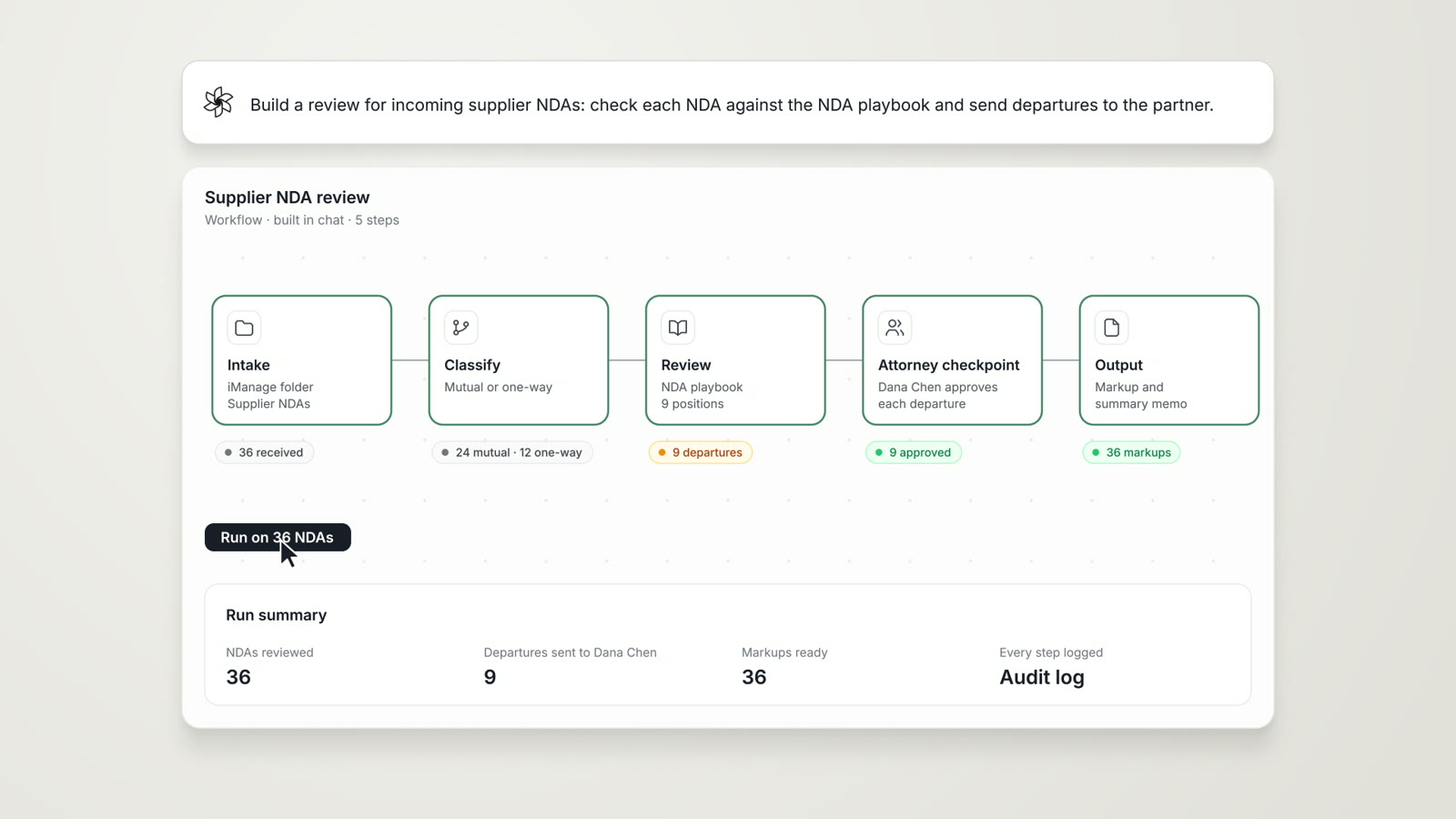
Agentic Workflows
Research, analysis, extraction and reporting chained into one cited work product, with an attorney checkpoint.
Read moreQuestions attorneys ask
What is an AtlasAI Playbook?
An AtlasAI Playbook contains your firm's approved positions, preferred language, fallback positions, required clauses, escalation points and commentary for one type of document.
How do we build a playbook?
Build the playbook from your firm's best precedents, your partners' preferences and each practice group's standards. AtlasAI can draft entries from signed agreements for your review.
Who maintains a playbook?
Your knowledge team maintains each playbook in one place, and super-admin, admin, member and viewer roles control every action in the application.
Where does AtlasAI apply the playbook?
AtlasAI applies the playbook in AtlasAI Chat, in the AtlasAI add-in for Word, in Tabular Review and in Agentic Workflows.
Can a playbook apply only to one practice group?
Yes. Assign each playbook to practice groups, matter types or individual attorneys.
How do I check a flag?
Each flag cites the playbook entry and the clause in the document, and you open both from the flag.
Which plan includes Playbooks?
Playbooks are part of the Enterprise plan, with pricing from the AtlasAI sales team. Every plan starts with a 3-day free trial on one matter.
Does AtlasAI train models on our playbooks?
No. Under the Master Subscription Agreement, AtlasAI uses no customer data to train, fine-tune or improve any model.