AI assistants for practice groups, with cited results
Set up an assistant for one workflow, with your firm's instructions, sources and output format. Publish the assistant to a practice group or the whole firm, and every attorney gets the same analysis, with a citation for each statement.
3-day free trial on one matter. No setup fee.
Attorneys draft, review and research with AtlasAI, starting from their best past work.



Practice group assistants
An assistant for each workflow
Give each assistant specific instructions, connected sources and an output format. Each assistant serves one workflow, from contract review to regulatory analysis.
- From a requestAsk AtlasAI to create an assistant that reviews NDAs against your firm's standard template and flags each departure.
- GuardrailsSet the guardrails and quality standards for each assistant, such as required citations and the sections of the output.
- Output formatsEach assistant returns the output in the format you set, such as a summary table or a memo.
Connected sources
The right sources for each assistant
Link each assistant to specific document collections, playbooks and sources. The assistant answers only from the linked sources, with each user's permissions applied.
- CollectionsLink an assistant to a document collection, such as the Private Equity group's signed credit agreements.
- Firm systemsAn assistant reads iManage, SharePoint, OneDrive and your matter workspaces.
- Permissions appliedEach user gets answers only from the documents that user may open.
Consistent results
The same analysis, every time
Each assistant follows your firm's instructions, with the same sources, analysis framework and output format on every run. The credit agreement summary assistant returns each agreement's facility terms with page citations.
- Repeatable reviewsAn attorney runs the due diligence assistant on the material contracts of a target company.
- Page citationsEach term in the output cites the page of the source document.
- Follow-up questionsAsk a follow-up question about the output in AtlasAI Chat.
Shared across your firm
Published to practice groups
Publish each assistant to specific practice groups or the whole firm from the assistant library. Your knowledge team tracks usage and refines each assistant over time.
- The assistant libraryAttorneys open their practice group's published assistants from one firm library.
- Usage and refinementThe knowledge team reviews usage and updates the instructions in one place.
- On your firm's knowledge graphEach assistant reads your firm's matters, positions and precedents in the knowledge graph.
An associate runs the credit agreement summary assistant
Project Kestrel, a buy-side private equity M&A matter.
What AtlasAI reads
 iManage
 SharePoint

 Project KestrelCredit agreement summaryKestrel credit agreementMaya Ortiz, Associate
You ask
The facility terms of the Kestrel credit agreement, from the commitment and the maturity to the covenants and the events of default, with a page citation for each term
The associate opens the library
Maya Ortiz opens the firm's assistant library and selects the Private Equity group's credit agreement summary assistant.
The assistant reads
The assistant reads the Kestrel credit agreement with the instructions and the output format the Private Equity group set.
The assistant answers
The assistant returns the facility terms in the standard summary table, with a page citation for each term.
The associate checks
Maya Ortiz opens the cited pages, confirms the covenants and sends the summary to Dana Chen.
From configuration to firm-wide use
Configure
Define the assistant's purpose, instructions and output format, and set the guardrails and quality standards.
Connect sources
Link the assistant to the document collections, playbooks and sources it reads.
Set instructions
Write detailed instructions for the analysis, the answers and the output format.
Deploy to your firm
Publish the assistant to specific practice groups or the whole firm, track usage and refine the assistant over time.
Built for the security review of a law firm
AtlasAI runs the security program on the SOC 2 Trust Services Criteria, and the AtlasAI security team shares the current audit status and the control documentation with your security reviewers. Under NDA, your security reviewers receive the AtlasAI Security and Compliance Posture Report and 12 corporate policies. Each deploying firm also receives the penetration test results.
Your deployment
Run AtlasAI in the AtlasAI cloud or in your firm’s Azure subscription, with the same controls in both.
Your permissions
AtlasAI agents read only the documents each user may open, with your iManage permissions and ethical walls applied to every step.
Your data
AtlasAI trains no model on your data, and every approved model provider works under zero data retention terms.
Your audit log
AtlasAI logs every question, answer and agent step. The managed service keeps the log for 365 days, with export, and a self-hosted deployment streams the log into your SIEM.
Related capabilities
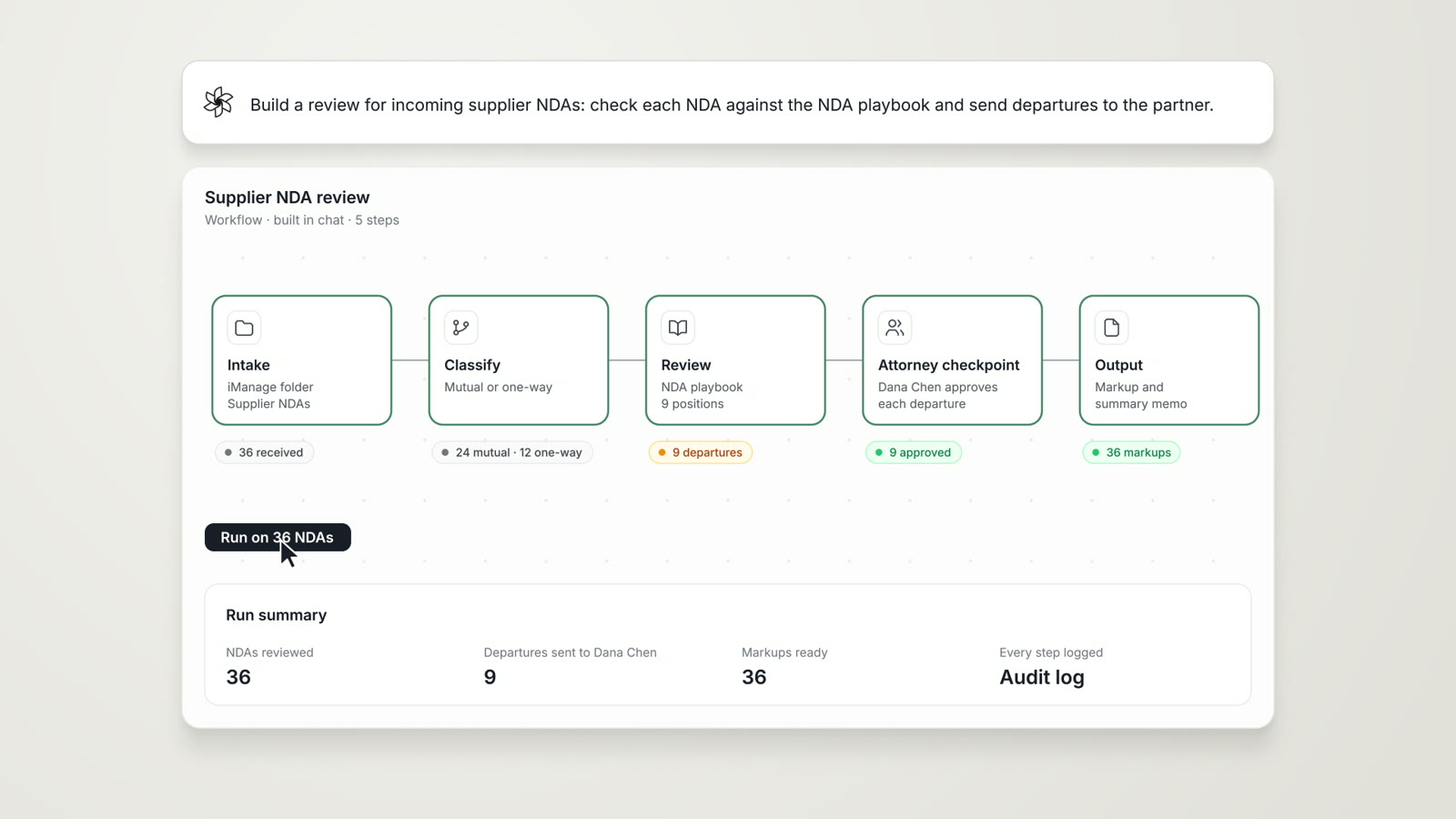
Agentic Workflows
Research, analysis, extraction and reporting chained into one cited work product, with an attorney checkpoint.
Read more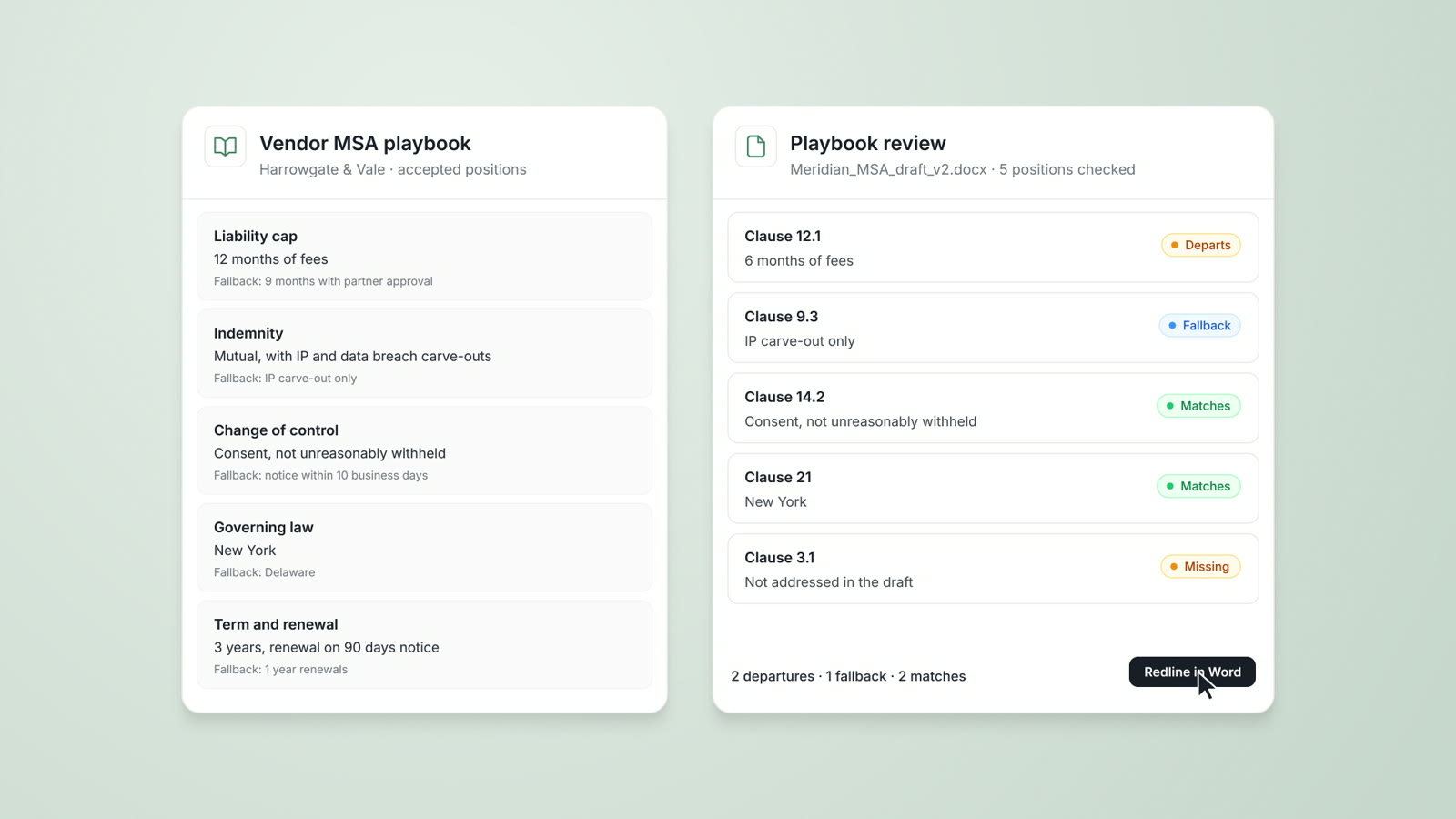
Playbooks
Your firm's approved positions, preferred language and fallbacks, checked on every document with each departure cited.
Read more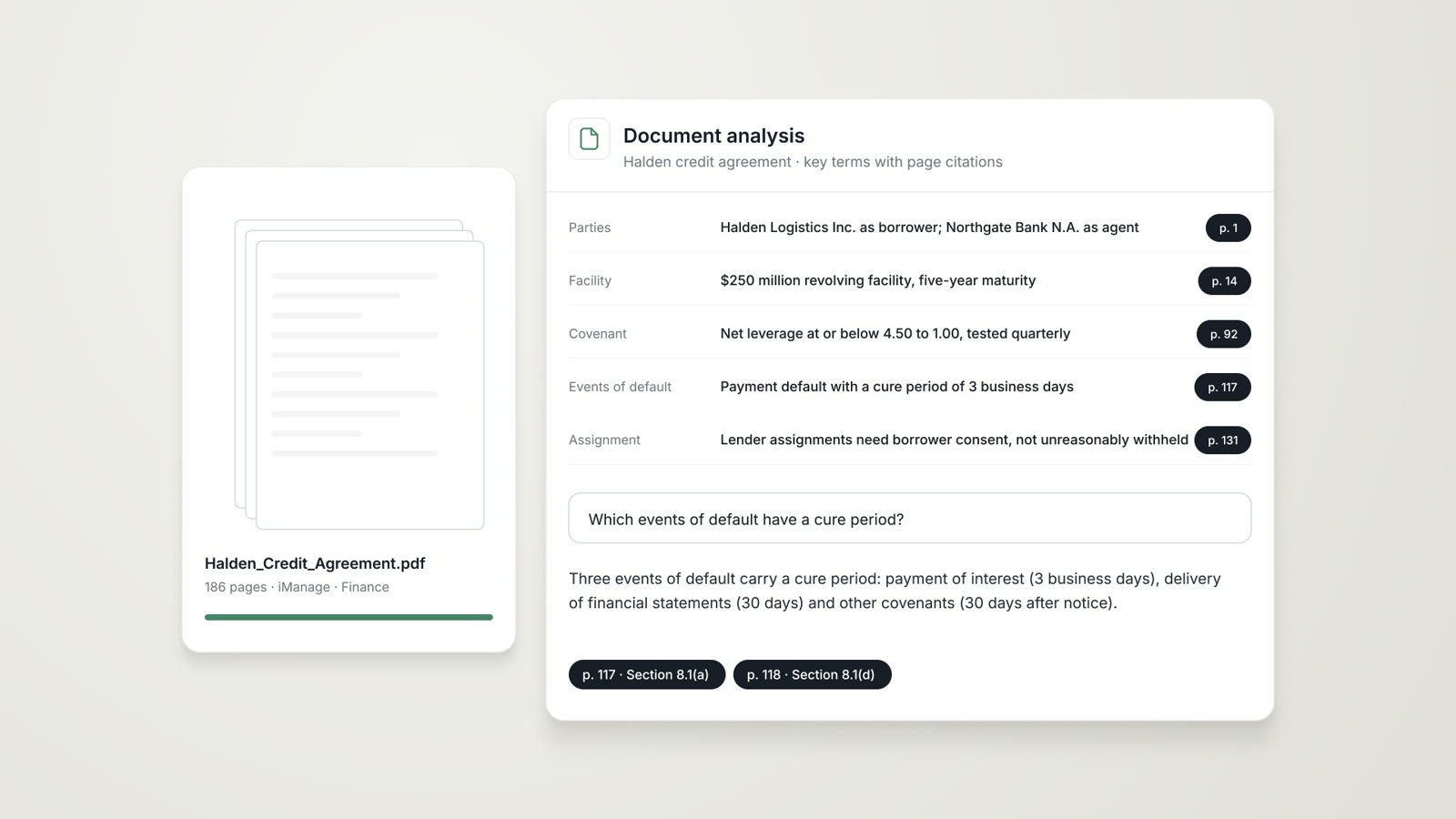
Document Analysis
A risk assessment, the extracted clauses and a plain-language summary of any contract, pleading or agreement, each finding cited.
Read moreQuestions attorneys ask
What is an AtlasAI Assistant?
An AtlasAI Assistant is set up for one workflow, with fixed instructions, connected sources and an output format, and published to a practice group or the whole firm.
Who builds an assistant?
Your knowledge team or an attorney sets up the assistant, and AtlasAI can draft the setup from a request in chat, such as an NDA review against the standard template.
Which sources can an assistant use?
An assistant uses the document collections, playbooks and firm systems you link, such as iManage, SharePoint and OneDrive, with each user's permissions applied.
How do we keep results consistent?
Each assistant uses the same sources, analysis framework and output format on every run, and you update the instructions in one place.
Can we limit an assistant to one practice group?
Yes. Publish each assistant to specific practice groups or to the whole firm.
Which plan includes AI Assistants?
AI Assistants are part of the Enterprise plan, with pricing from AtlasAI sales. Every plan starts with a 3-day free trial on one matter.
Does AtlasAI train models on assistant instructions or outputs?
No. Under the Master Subscription Agreement, AtlasAI uses no customer data to train, fine-tune or improve any model.