AI contract review against your firm playbook
AtlasAI reviews every contract against your firm's past positions, preferred language and approved playbooks, so each flag reflects your practice. Each flag cites the playbook or precedent behind the flag, and each redline arrives in Word as a tracked change.
3-day free trial on one matter. No setup fee.
Attorneys draft, review and research with AtlasAI, starting from their best past work.


Playbook enforcement
Your standards applied to every contract
The firm defines standard positions on indemnification, liability caps, termination, governing law and any other provision, with the preferred language and the fallback for each position. AtlasAI flags each departure from the approved language and suggests the correction from the playbook.
- Positions and fallbacksEach playbook entry holds the standard position, the preferred language and the fallback position the firm accepts.
- A set of contractsAn attorney asks AtlasAI to review a set of NDAs against the corporate NDA playbook, and AtlasAI flags every departure in each NDA.
- Firm historyAtlasAI compares each clause with the positions the firm accepted on prior matters, in addition to the playbook.
Redlining in Word
Redlines against your preferred terms, in Word
AtlasAI compares a counterparty draft with your firm's preferred terms and highlights every departure. The AtlasAI add-in inserts each suggested correction into the draft in Microsoft Word as a tracked change, for the attorney to accept or reject.
- Counterparty draftsAn attorney asks AtlasAI to redline a vendor agreement against your firm's standard terms, and AtlasAI marks each departure.
- Tracked changesEach correction arrives in the draft as a tracked change with a comment that cites the playbook position.
- You decideYou accept, edits or reject each tracked change in Word.
Risk assessment
A structured risk analysis of every contract
AtlasAI prepares a structured risk assessment of each contract: high-risk clauses flagged, departures identified and compliant terms confirmed. Upload a contract, a pleading or an agreement and receive a plain-language summary with page citations.
- Gaps and exposureAn attorney asks AtlasAI to analyze a credit agreement for indemnification gaps and liability exposure, and AtlasAI returns each gap with the page cited.
- Compliant terms confirmedAtlasAI lists the terms that meet the playbook beside the terms that depart, in one risk report.
- Plain-language summariesAtlasAI summarizes each high-risk clause in plain language for the partner or the client.
Cited sources
Every suggestion links to the source
Every flag, suggestion and risk assessment includes a citation to your firm's precedent or to the clause in question. You click a citation and open the source with the language highlighted.
- The source of a flagAn attorney asks for the source of a limitation of liability flag, and AtlasAI opens the playbook entry and the clause.
- A citation in each cellIn a review of many contracts, each cell of the table cites the clause in the source contract.
- Permitted documents onlyAtlasAI cites only documents the user may open, with iManage permissions and ethical walls applied.
An associate reviews a vendor MSA against the playbook
Meridian Cloud Services MSA, a commercial contracts matter for a portfolio company of a sponsor client.
What AtlasAI reads
 iManage
 SharePoint

 Meridian Cloud Services MSASharePointVendor MSA playbookSharePointLiability cap at 12 months of feesSam Okafor, Associate
You ask
Each clause of the Meridian draft marked as matches, departs, fallback or missing, with the playbook position cited and a tracked change for each departure
The associate asks
Sam Okafor opens the Meridian draft in Word and asks the AtlasAI add-in for a review against the Vendor MSA playbook.
AtlasAI compares
AtlasAI compares each clause with the playbook position and fallback, and finds a liability cap of 6 months of fees in Clause 12.1.
AtlasAI marks the draft
AtlasAI marks Clause 12.1 as a departure from the cap of 12 months of fees and inserts the playbook language as a tracked change.
The associate decides
Sam Okafor accepts the tracked change, keeps the cited comment for Dana Chen and sends the markup to the partner.
Four results for each clause
AtlasAI marks each clause of a draft with one of four results, and each result cites the playbook entry behind the result.
| Result | What the result means | What the attorney does |
|---|---|---|
| Matches | The clause meets the standard position of the playbook | Confirms the clause and moves to the next clause |
| Departs | The clause departs from the standard position, such as a liability cap of 6 months of fees against a standard of 12 months | Accepts, edits or rejects the suggested correction, inserted as a tracked change |
| Fallback | The clause meets the fallback position the firm accepts | Confirms that the fallback suits the client and the deal |
| Missing | The draft lacks a provision the playbook requires | Inserts the preferred language of the playbook |
Why review against your firm's standards
A flag matters when the flag reflects your firm's standards. AtlasAI reviews each contract against your firm's past positions, preferred language and approved playbooks, so each flag points to a position your firm takes.
On the sample NDA in the interactive review on this page, AtlasAI flags an overly broad definition of Confidential Information. AtlasAI suggests the playbook language: information marked as confidential, or information a reasonable party considers confidential under the circumstances, excluding publicly available information. The suggestion cites Section 2.3 of the corporate NDA playbook.
You remain the reviewer. AtlasAI prepares the flags, the corrections and the risk report, and you decide each change before the markup reaches the counterparty.
From upload to review
Upload
You drag and drops contracts or connect the document management system. AtlasAI reads PDF, DOCX and scanned documents.
Apply the playbook
Select or create a playbook with your firm's standard positions and preferred language.
Review
AtlasAI flags each departure, suggests each correction and prepares a structured risk report with citations.
Act
You accept suggestions in Word, exports the report or continue the conversation about the analysis in AtlasAI Chat.
Built for the security review of a law firm
AtlasAI runs the security program on the SOC 2 Trust Services Criteria, and the AtlasAI security team shares the current audit status and the control documentation with your security reviewers. Under NDA, your security reviewers receive the AtlasAI Security and Compliance Posture Report and 12 corporate policies. Each deploying firm also receives the penetration test results.
Your deployment
Run AtlasAI in the AtlasAI cloud or in your firm’s Azure subscription, with the same controls in both.
Your permissions
AtlasAI agents read only the documents each user may open, with your iManage permissions and ethical walls applied to every step.
Your data
AtlasAI trains no model on your data, and every approved model provider works under zero data retention terms.
Your audit log
AtlasAI logs every question, answer and agent step. The managed service keeps the log for 365 days, with export, and a self-hosted deployment streams the log into your SIEM.
Related pages
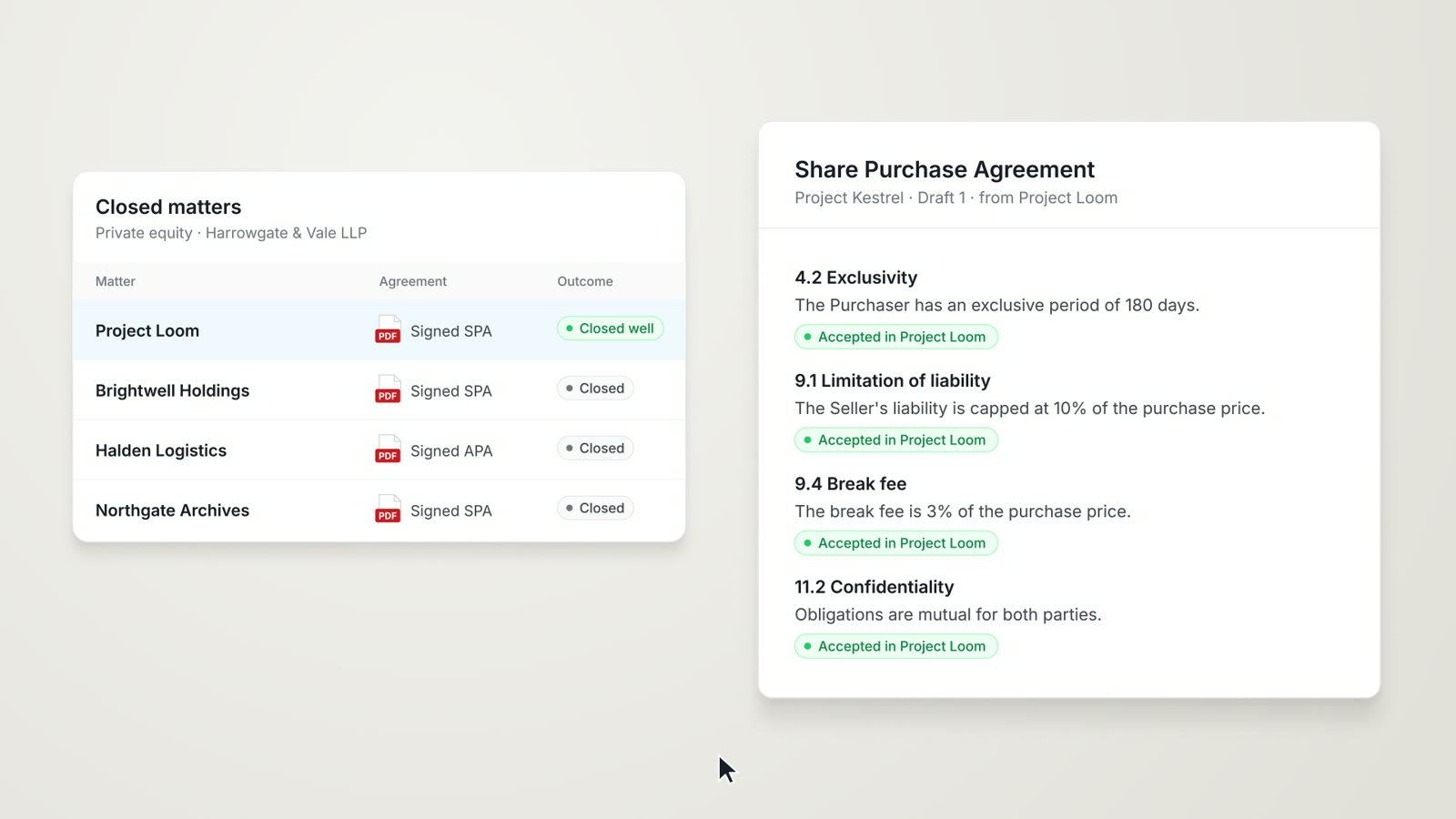
AI contract drafting
Drafting in Word from your firm's precedent, with playbook standards applied and redlines as tracked changes.
Read more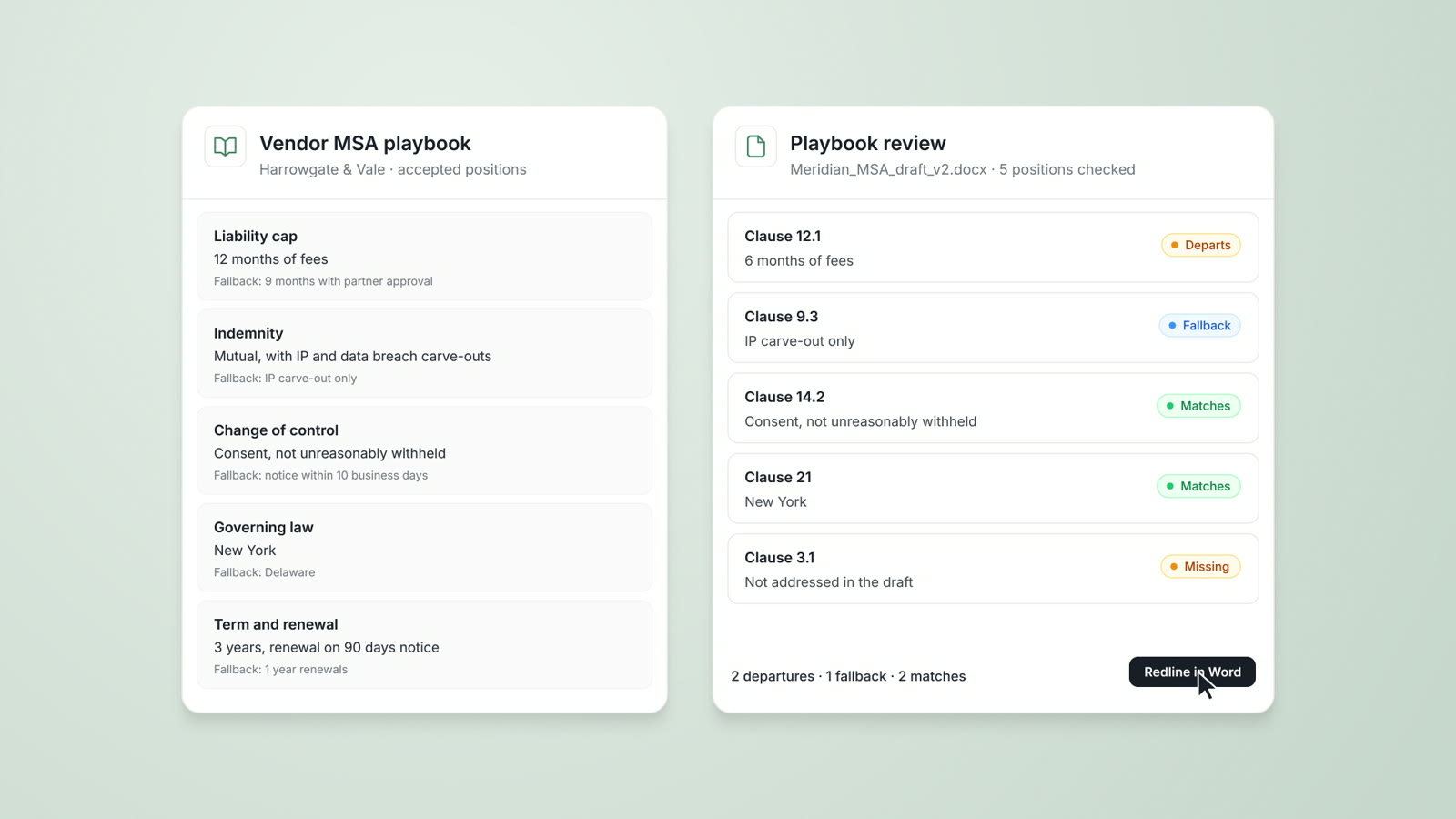
Playbooks
Your firm's approved positions, preferred language and fallbacks, checked on every document with each departure cited.
Read more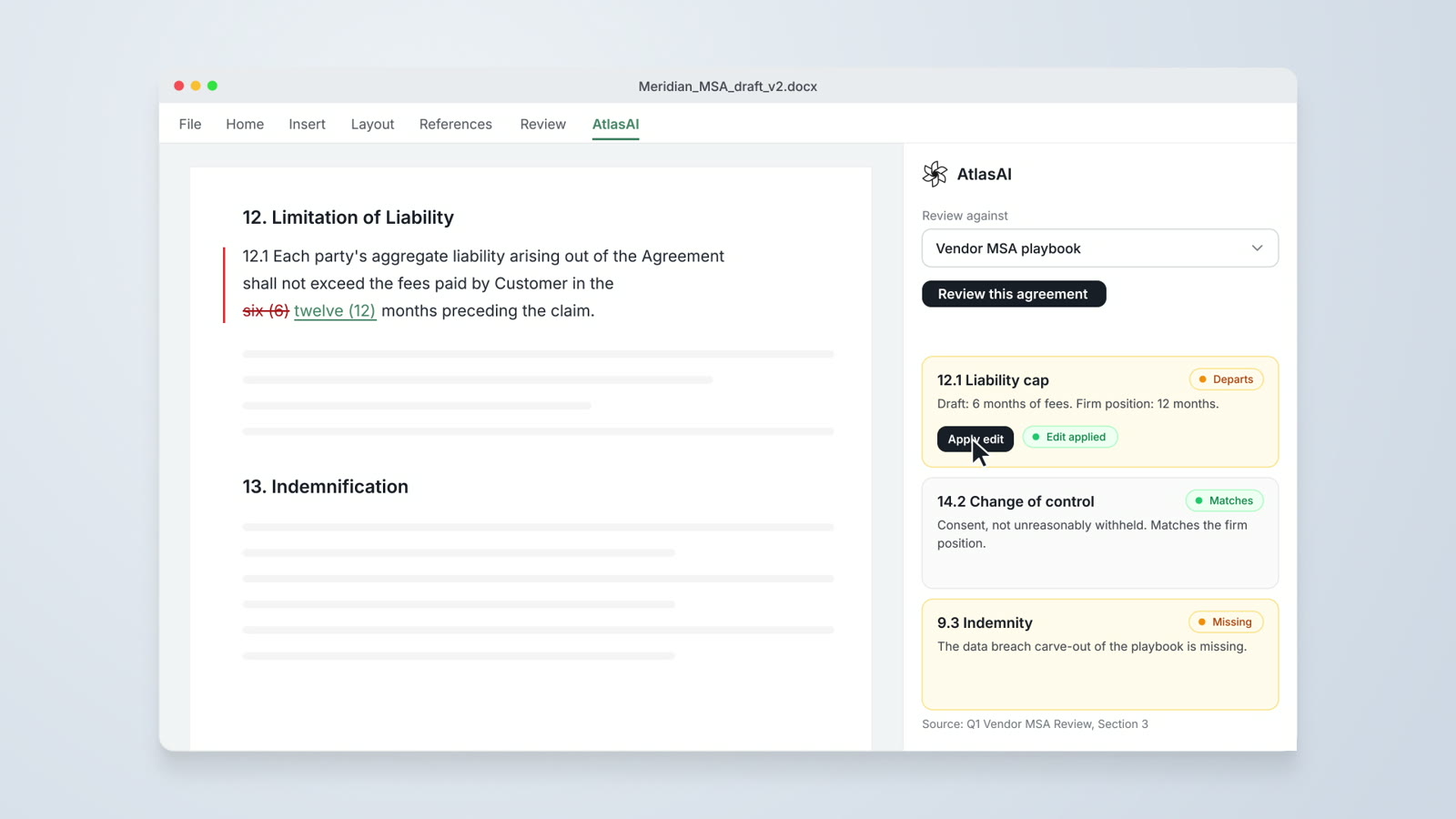
AtlasAI for Word
Drafting from precedent, redlines against preferred language and playbook checks, inside Microsoft Word.
Read moreQuestions attorneys ask
Which contracts can AtlasAI review?
AtlasAI reviews NDAs, MSAs, supplier contracts, credit agreements, purchase agreements and other commercial agreements, in PDF, DOCX or scanned form.
Which playbook does AtlasAI apply?
AtlasAI applies your firm's playbooks: the standard positions, the preferred language and the fallbacks the firm defines for each provision. Playbooks are part of the Enterprise plan.
How does a firm without a playbook start?
AtlasAI drafts playbook entries from your firm's signed agreements, and the practice group reviews each entry before AtlasAI applies the playbook. Playbooks are part of the Enterprise plan.
Does AtlasAI redline in Microsoft Word?
Yes. The AtlasAI add-in reviews the draft in Word against the playbook and inserts each correction as a tracked change, for the attorney to accept or reject.
How does the attorney check a flag?
Each flag cites the playbook entry or the precedent behind the flag. You click the citation and read the source with the language highlighted.
Can AtlasAI review many contracts at once?
Yes. Tabular Review answers the same questions across a set of contracts, and Agentic Workflows apply a playbook review to a set, such as 36 supplier NDAs. Both are part of the Professional plan, and Playbooks are part of Enterprise.
Does AtlasAI train models on our contracts?
No. Under the Master Subscription Agreement, AtlasAI uses no customer data to train, fine-tune or improve any model, and zero data retention terms bind every approved model provider.
How does a firm try AI contract review?
The interactive review on this page applies a standard NDA playbook to a sample NDA. For your firm's contracts, every plan starts with a 3-day free trial on one matter, with no commitment.