AI for lawyers, grounded in firm precedent
AtlasAI reads iManage and SharePoint and connects your firm's work product into one knowledge graph. Attorneys ask, analyze documents, research and search, and every answer cites your firm's precedent.
3-day free trial on one matter. No setup fee.
Attorneys draft, review and research with AtlasAI, starting from their best past work.



Connected to the systems your firm already uses
AtlasAI reads documents, matters and positions from the systems your firm already uses, and applies each system’s permissions to every answer.
 iManage
Workspaces, folders and documents from iManage Work, with new versions saved back to the workspace.
 SharePoint
Sites and document libraries, indexed with each library's permissions.

Workspaces and documents from NetDocuments, read with each attorney's access rights.

Clients, matters and attorney assignments from Intapp, so every answer starts from the matter.
Cited legal answers
Complex questions, cited answers
AtlasAI grounds every answer in your firm's documents, precedents and knowledge. Click a citation, open the source passage and check the answer against the source language.
- Across many dealsAsk for the key indemnification provisions across your firm's last 50 M&A deals, and AtlasAI answers with a citation for each deal.
- Accepted positionsThe answer states the position the firm accepted on prior matters and flags each departure in the current draft.
- Permitted documents onlyAtlasAI applies your firm's iManage permissions and ethical walls to every answer.
Document analysis
Structured analysis of any legal document
Upload a contract, a pleading or an agreement, and AtlasAI returns a structured risk assessment, the extracted clauses and a plain-language summary. AtlasAI reads the legal structure of the document, such as definitions, cross-references and schedules, in addition to the text.
- Key risk provisionsAn attorney asks for the key risk provisions of a credit agreement, and AtlasAI returns each provision with a page citation.
- Clause extractionAtlasAI extracts the governing clauses of the document, such as the liability cap, change of control and governing law.
- Follow-up questionsAsk a follow-up question, such as the cure period for a covenant breach, and AtlasAI answers with the page cited.
Legal research
Research with every opinion verified
AtlasAI agents compare regulatory frameworks, prepare cited summaries and complete multi-step research. AtlasAI verifies each opinion in CourtListener and cites SEC filings from EDGAR, and the research memo cites each authority.
- Regulatory comparisonsAn attorney asks for the data privacy requirements of the EU, the UK and California, and AtlasAI compares the frameworks in one cited answer.
- Case law verifiedAtlasAI checks each case citation against the opinion in CourtListener before the memo reaches the attorney.
- A cited research memoAtlasAI drafts the research memo with each authority cited, for the review of the attorney.
Enterprise Search
One search across every firm system
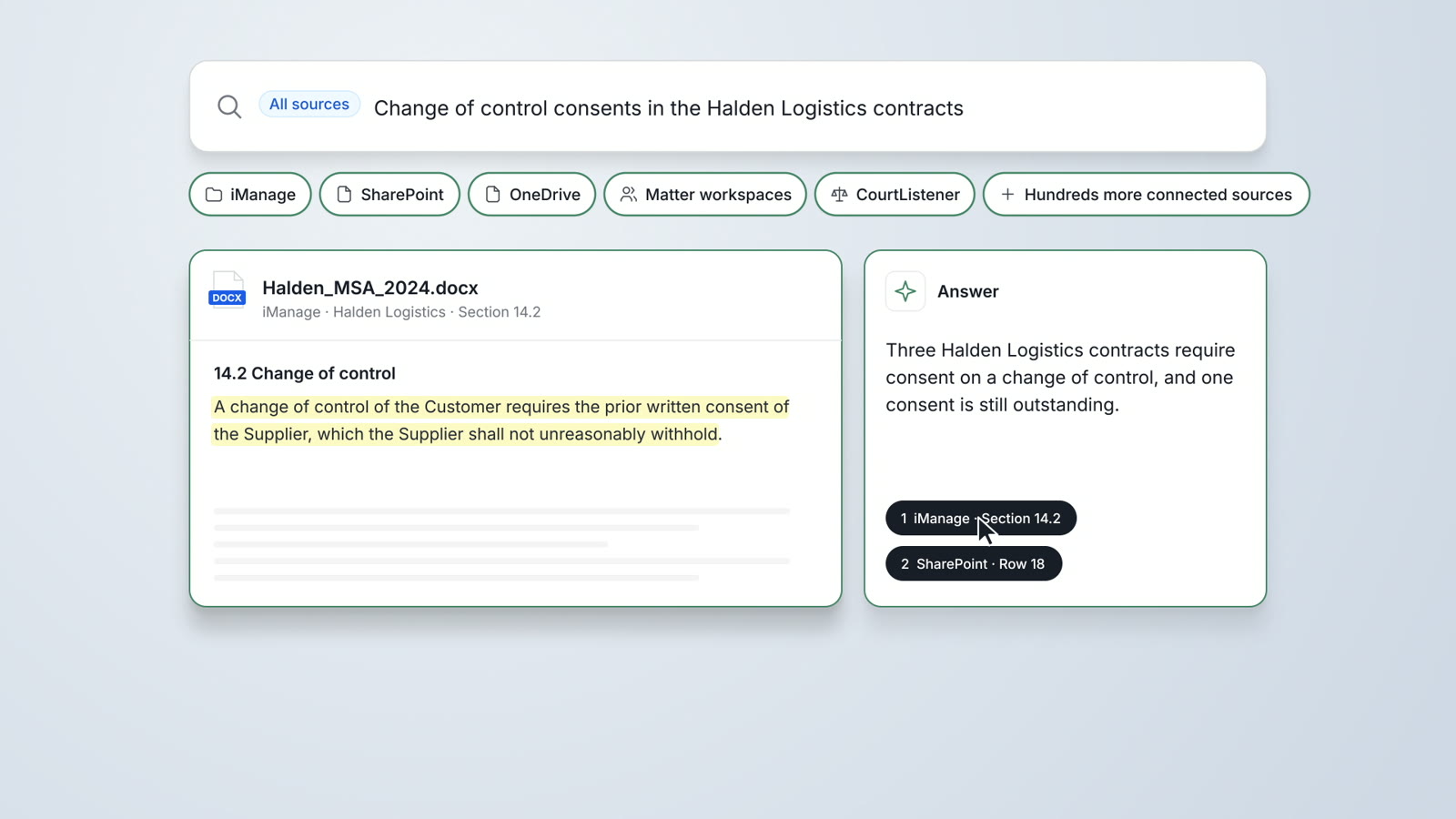
AtlasAI searches iManage, SharePoint, OneDrive, the matter workspaces and CourtListener from one interface. State the clause, the client and the period, and AtlasAI returns the matching documents with a cited answer.
- Prior opinionsAsk for every prior opinion your firm wrote on force majeure clauses in the past 3 years, and AtlasAI returns each opinion with its matter.
- The original documentOpen the original document in iManage or SharePoint from the result.
- Permissions appliedEach search returns only the documents the user may open.
An associate reviews the risk provisions of a credit agreement
Project Kestrel, a buy-side private equity M&A matter.
What AtlasAI reads
iManageSharePointProject KestrelCredit agreement, 186 pagesSharePointPrivate Equity financing positionsMaya Ortiz, AssociateYou ask
The key risk provisions of the 186-page credit agreement, with the events of default, the cure periods and the financial covenants cited to the page
The associate asks
Maya Ortiz uploads the 186-page Kestrel credit agreement and asks for the key risk provisions.
AtlasAI reads the agreement
AtlasAI reads the definitions, the covenants, the events of default and the schedules of the credit agreement.
AtlasAI answers
The answer lists the key terms with a page citation for each term, and Maya Ortiz asks a follow-up question about the cure periods.
The associate checks
Maya Ortiz opens the cited pages, confirms the cure periods and sends the summary to Dana Chen for review.
Four properties of AI built for lawyers
AI for legal work requires privacy, citations, firm knowledge and compliance. The table states how AtlasAI meets each property.
| Property | What legal work requires | In AtlasAI |
|---|---|---|
| Privacy | Client documents stay under your firm's controls | AtlasAI deploys in your firm's Azure subscription or in the AtlasAI cloud, and trains no model on firm data |
| Citations | Every answer traces to a source | AtlasAI cites each statement to the passage in the source document |
| Firm knowledge | Answers draw on your firm's documents and precedent | The knowledge graph connects your firm's matters, accepted positions and precedents |
| Compliance | The platform meets your firm's security review | SOC 2 Type II audit in progress, with the current status shared under NDA; control set mapped to HITRUST CSF e1; standard DPA covering GDPR and CCPA |
AtlasAI in the daily work of an attorney
Each morning, the attorney opens a queue of work AtlasAI prepared overnight: markups against the playbook, summaries of new documents in the data room and research memos for review.
During the day, you ask questions in AtlasAI Chat, review drafts in the AtlasAI add-in for Word and compare a set of agreements in Tabular Review. Every statement and every cell carries a citation.
Every output is a draft for the attorney. AtlasAI cites each source, and you accept, edits or rejects each statement before the work reaches the client.
How an attorney starts
Start the trial
Start a 3-day free trial on one matter, with no setup fee and no commitment.
Add the documents
Upload the documents of the matter, or connect iManage and SharePoint on Professional and Enterprise.
Ask and analyze
Ask questions in AtlasAI Chat, analyzes documents and search the sources of the matter.
Review and decide
Open each citation, accepts or edit each statement and move the work into the draft in Word.
Built for the security review of a law firm
AtlasAI is preparing for a SOC 2 Type II audit by an independent CPA firm, and your security reviewers receive the current status under NDA. Under NDA, your security reviewers receive the AtlasAI Security and Compliance Posture Report and 12 corporate policies. Each deploying firm also receives the penetration test results.
Your deployment
Run AtlasAI in the AtlasAI cloud or in your firm’s Azure subscription, with the same controls in both.
Your permissions
AtlasAI agents read only the documents each user may open, with your iManage permissions and ethical walls applied to every step.
Your data
AtlasAI trains no model on your data, and every approved model provider works under zero data retention terms.
Your audit log
AtlasAI logs every question, answer and agent step. The managed service keeps the log for 365 days, with export, and a self-hosted deployment streams the log into your SIEM.
Related pages
The guide to legal AI
What legal AI is, the five workflows where legal AI delivers value, seven evaluation questions and a 90-day rollout plan.
Read more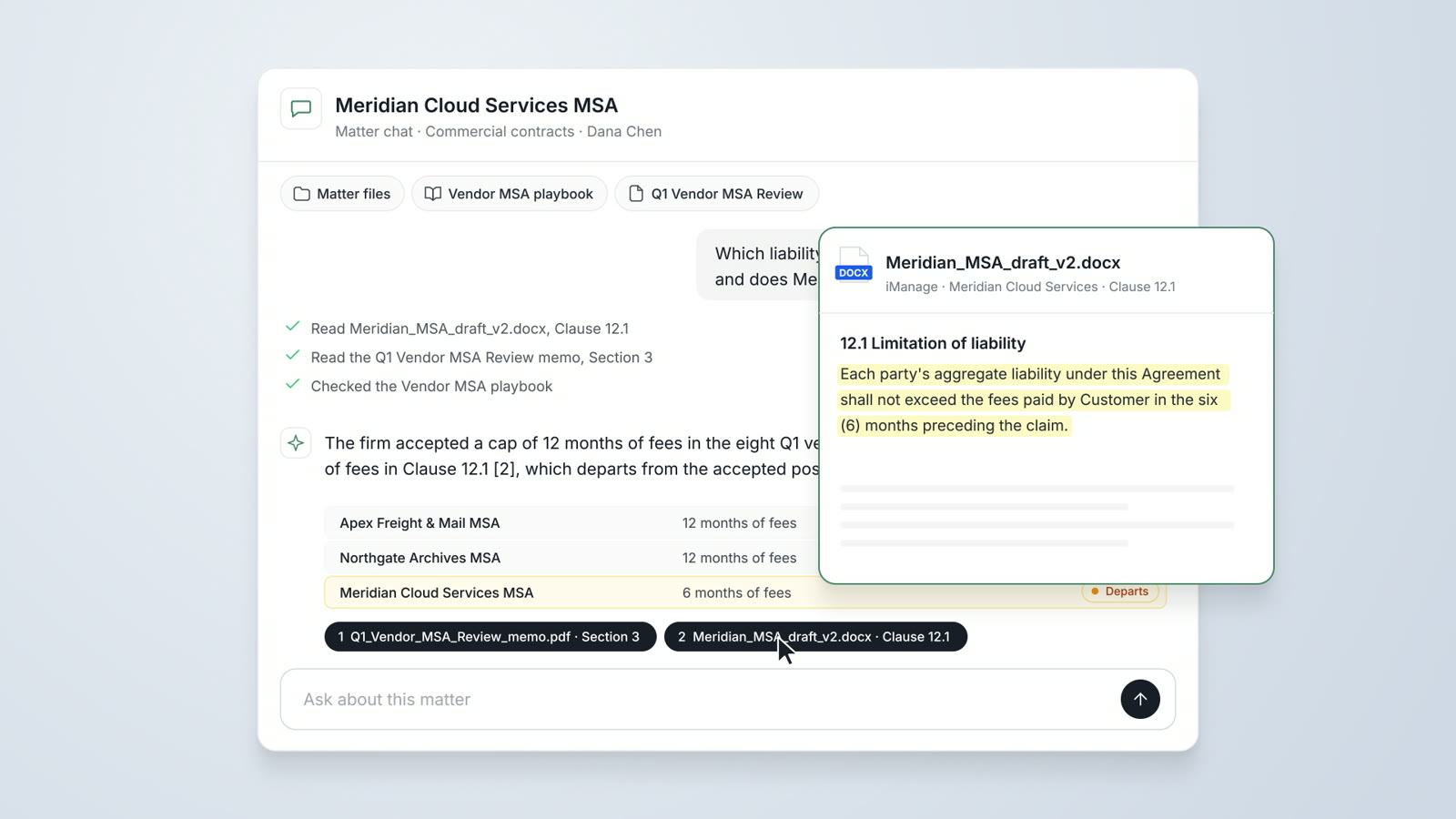
AtlasAI Chat
Answers from your firm's matters, accepted positions and precedents, with a citation on every statement.
Read more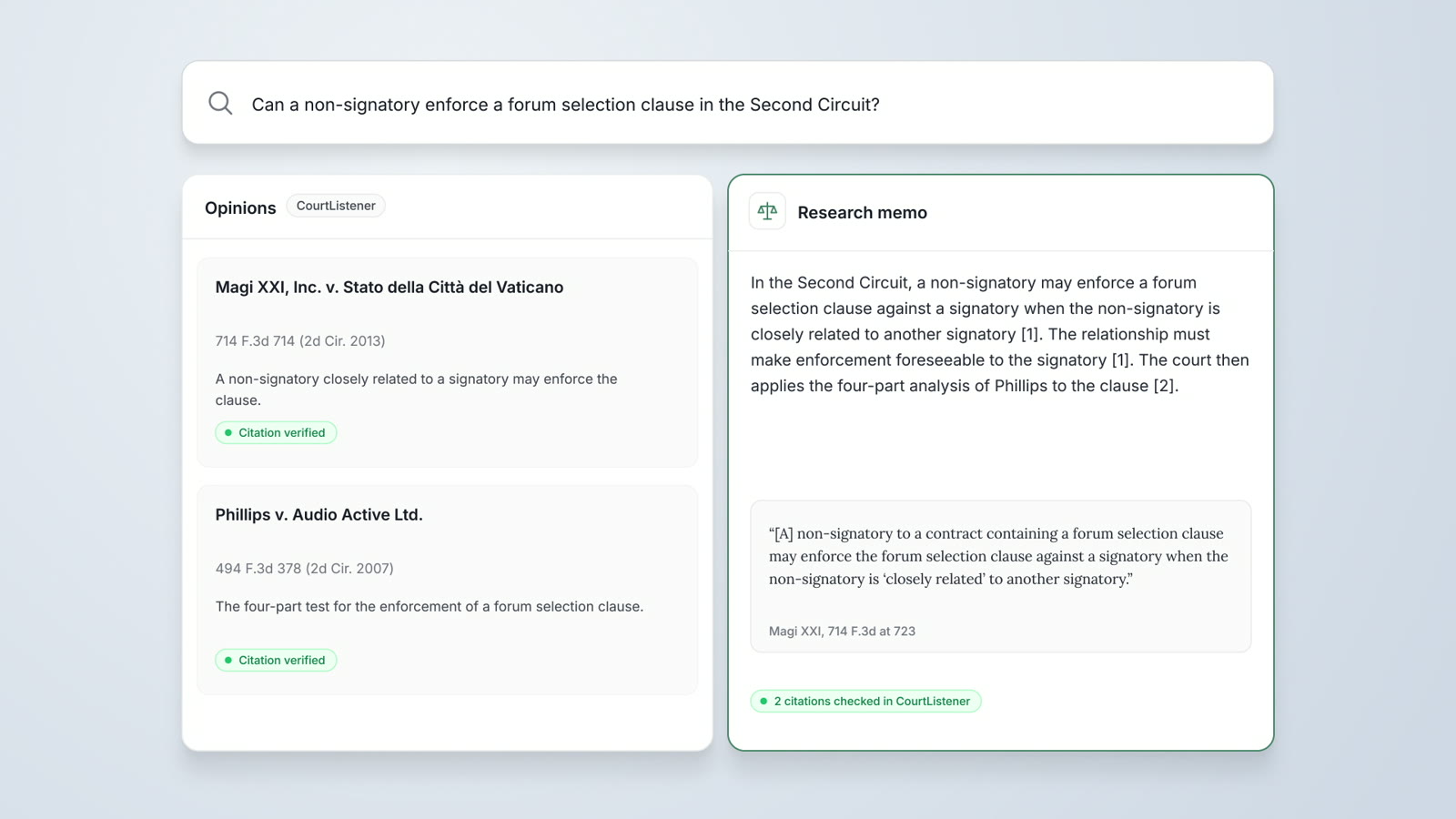
Legal Research
Research agents verify each opinion in CourtListener, cite SEC filings from EDGAR and prepare a cited research memo.
Read moreQuestions attorneys ask
What does AtlasAI do for a lawyer?
AtlasAI answers legal questions from your firm's documents, analyzes contracts and pleadings, researches case law verified in CourtListener and searches iManage, SharePoint and OneDrive, with a citation on each statement.
How does AtlasAI differ from a general-purpose chatbot?
AtlasAI answers from your firm's documents, matters and precedents, cites each statement to the source passage and checks case citations in CourtListener. AtlasAI deploys under your firm's controls and trains no model on firm data.
Which documents can AtlasAI analyze?
AtlasAI analyzes contracts, pleadings, agreements, memos and data room documents. Enterprise adds Data Analysis of XLSX and CSV files.
Which sources does AtlasAI use for legal research?
AtlasAI uses CourtListener for case law and EDGAR for SEC filings, together with your firm's research memos and opinions. Legal Research is part of the Professional plan.
Which systems does Enterprise Search cover?
Enterprise Search covers iManage, SharePoint, OneDrive, your firm's matter workspaces and CourtListener, with iManage permissions and the firm's document access rules applied.
Does AtlasAI train models on our documents?
No. Under the Master Subscription Agreement, AtlasAI uses no customer data to train, fine-tune or improve any model, and zero data retention terms bind every approved model provider.
Which plan fits a lawyer or a small team?
Starter costs $25 per user per month and includes Chat with citations, Enterprise Search, document analysis, agentic workspaces and drafting. Professional adds the knowledge graph, Tabular Review, Legal Research, Agentic Workflows, practice management and the iManage, SharePoint and NetDocuments connections. Every plan starts with a 3-day free trial on one matter.