AtlasAI for Microsoft Word, with firm playbooks and precedent
Draft from precedent, redline a counterparty draft and check the final draft against your playbook, without leaving Microsoft Word. The AtlasAI add-in brings your firm's precedents, preferred language and playbooks into Word, and every change arrives as a tracked change.
3-day free trial on one matter. No setup fee.
Attorneys draft, review and research with AtlasAI, starting from their best past work.



An associate drafts the Loom SPA in Word from the signed Brightwell SPA
Project Loom, a private equity M&A matter.
What AtlasAI reads
 iManage
 SharePoint

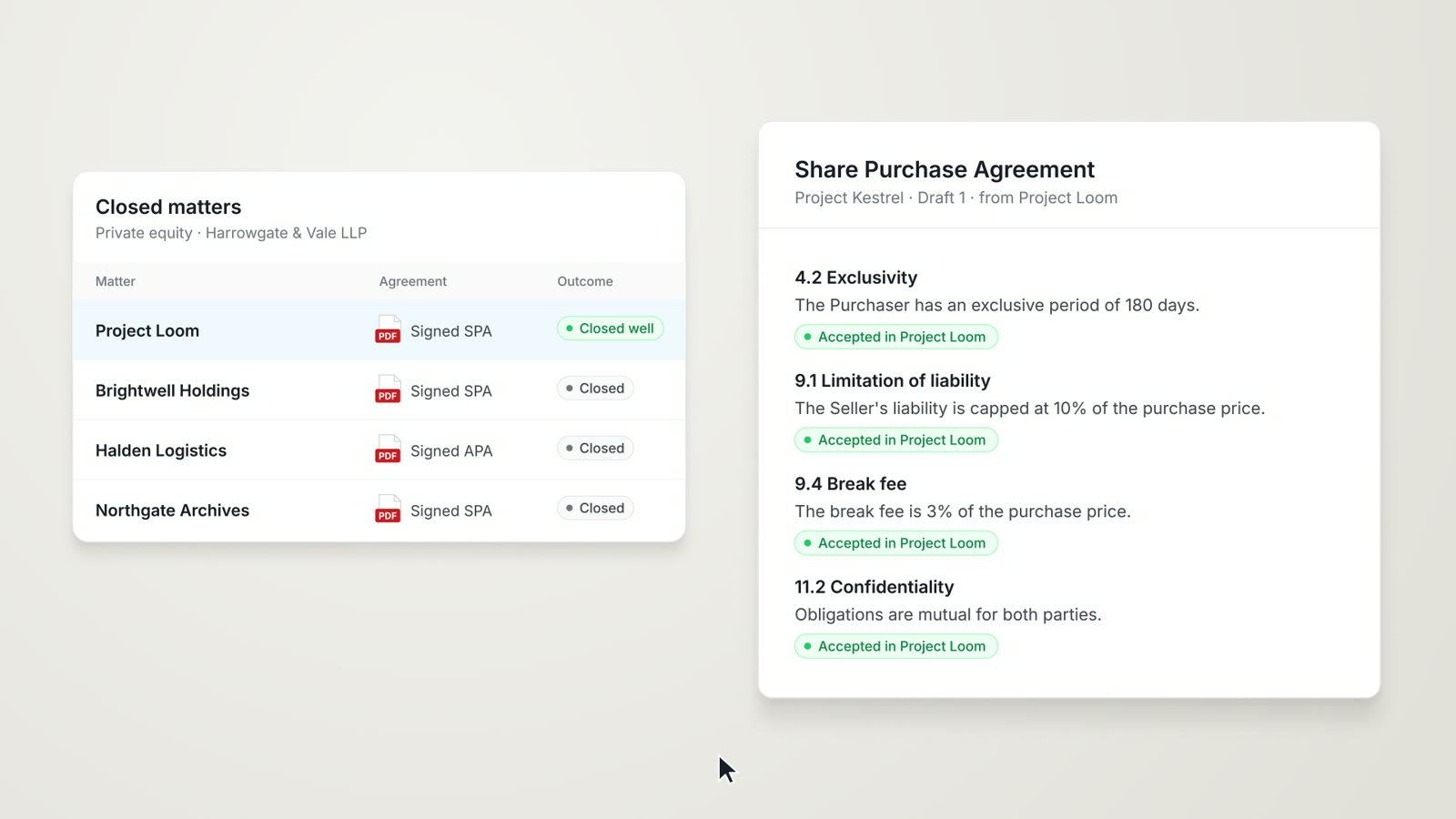
 Project LoomiManageBrightwell Holdings SPA, signedSharePointIndemnity cap at 10% of the purchase priceMaya Ortiz, Associate
You ask
A first draft of the Loom SPA in Word, with the indemnity cap at 10% of the purchase price and a comment that cites Section 8.3 of the Brightwell agreement
The associate asks
Maya Ortiz opens a blank document in Word and asks the AtlasAI add-in to start the Loom SPA from the signed Brightwell Holdings SPA.
AtlasAI reads the precedent
AtlasAI reads the Brightwell agreement and the positions the firm accepted on the Brightwell matter.
AtlasAI drafts
AtlasAI inserts the draft with the indemnity cap at 10% of the purchase price and a comment that cites Section 8.3 of the Brightwell agreement.
The associate decides
Maya Ortiz adjusts the terms for the Loom buyer and sends the draft to Dana Chen for review.
Review in Word
AI review in the Word task pane
Ask for a review in the AtlasAI task pane, and AtlasAI flags risks, missing clauses and departures from your firm's standards. Each suggestion cites the precedent or playbook entry behind the suggestion.
- A review on requestAsk AtlasAI to review a settlement agreement against your firm's standard terms and flag every risk.
- Missing clausesAtlasAI flags each clause your standards require and the draft lacks.
- Grounded in precedentEach suggestion cites your precedent library or your playbook.
Redlining
Redlines against your preferred language
AtlasAI compares any document with your standard terms and preferred language, highlights each departure and suggests the correction from your playbook. Each redline arrives as a tracked change, backed by your firm's approved position.
- Counterparty draftsAsk AtlasAI to redline a counterparty draft against your standard indemnification and limitation of liability provisions.
- Tracked changesAtlasAI inserts each correction as a tracked change with a comment that cites the playbook position.
- Alternative languageAtlasAI suggests your playbook's fallback language when the counterparty rejects the approved position.
Drafting from precedent
First drafts from your firm's templates
Pick a template from your precedent library, or start from a blank document with AtlasAI. AtlasAI prepares a first draft from your firm's templates, prior deals and standards.
- The precedent libraryPick a signed agreement from a closed matter as the starting point.
- Accepted positionsAtlasAI drafts with the positions your firm accepted on the closed matter.
- Clause suggestionsAsk for language for one clause, such as force majeure, and AtlasAI suggests the clause from your firm's precedent.
Playbook check
Every draft checked before sending
Before you send the draft, AtlasAI checks the final draft against your firm's playbooks and standards and marks each clause as matching, departing, at the fallback position or missing.
- The final checkRun a check of the final draft against the playbook before circulation.
- Four resultsEach clause receives one of four results, with the playbook entry cited.
- Positions and client preferencesAtlasAI reads your firm's accepted positions, signed precedents and client preferences for each check.
From template to final draft in Word
Select the template
Pick a template from your precedent library, or start from a blank document with AtlasAI.
AtlasAI drafts
AtlasAI prepares a first draft from your firm's templates, prior deals and standards.
Redline review
Compare the draft with each counterparty version and get redlines with suggested alternative language.
Playbook check
AtlasAI checks the final draft against your firm's playbooks and standards before you send the draft.
Built for the security review of a law firm
AtlasAI runs the security program on the SOC 2 Trust Services Criteria, and the AtlasAI security team shares the current audit status and the control documentation with your security reviewers. Under NDA, your security reviewers receive the AtlasAI Security and Compliance Posture Report and 12 corporate policies. Each deploying firm also receives the penetration test results.
Your deployment
Run AtlasAI in the AtlasAI cloud or in your firm’s Azure subscription, with the same controls in both.
Your permissions
AtlasAI agents read only the documents each user may open, with your iManage permissions and ethical walls applied to every step.
Your data
AtlasAI trains no model on your data, and every approved model provider works under zero data retention terms.
Your audit log
AtlasAI logs every question, answer and agent step. The managed service keeps the log for 365 days, with export, and a self-hosted deployment streams the log into your SIEM.
Related capabilities
AI contract drafting
Drafting in Word from your firm's precedent, with playbook standards applied and redlines as tracked changes.
Read more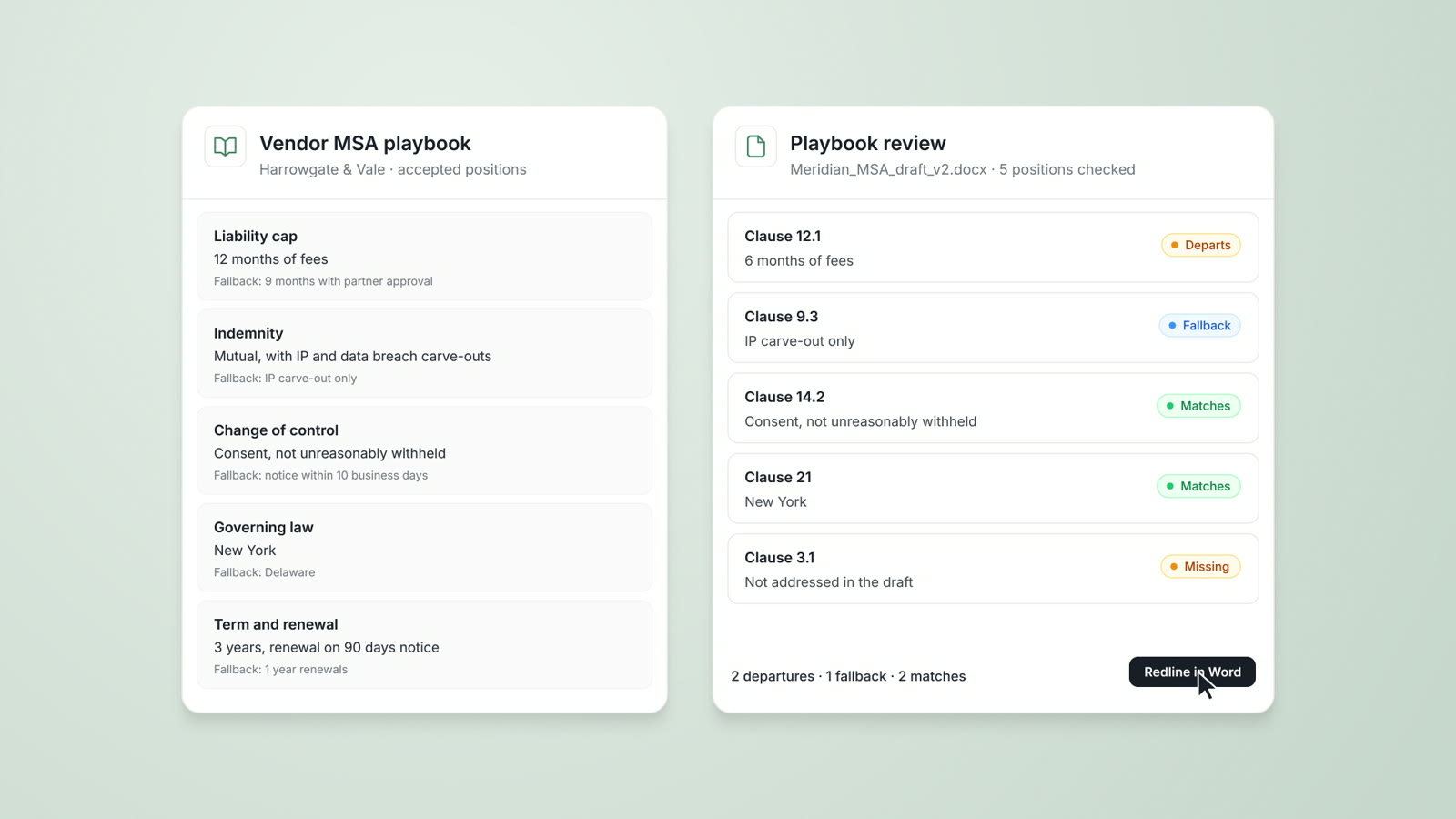
Playbooks
Your firm's approved positions, preferred language and fallbacks, checked on every document with each departure cited.
Read moreAI contract review
Contract review against your firm's playbooks and past positions, with tracked changes in Word and a citation on every flag.
Read moreQuestions attorneys ask
How does a firm install the Word add-in?
A Microsoft 365 administrator deploys the AtlasAI add-in through Integrated apps in the Microsoft 365 admin center, and attorneys open AtlasAI from the Word ribbon.
What can I do in the add-in?
Draft from precedent, review a draft against your firm's standards, redline a counterparty draft and check the final draft against the playbook, all inside Word.
How do suggestions appear in the draft?
AtlasAI inserts each suggestion as a tracked change with a comment that cites the playbook entry or the precedent, and you accept or reject each change.
Does the add-in use our firm's playbooks?
Yes. The add-in applies your firm's playbooks, preferred language and fallback positions. Playbooks are part of the Enterprise plan.
Which documents does the add-in read?
The add-in reads the open draft and the precedents, playbooks and matters each user may open, with your iManage permissions and ethical walls applied.
Does AtlasAI train models on our drafts?
No. Under the Master Subscription Agreement, AtlasAI uses no customer data to train, fine-tune or improve any model, and every approved model provider works under zero data retention terms.
How do we start?
Every plan starts with a 3-day free trial on one matter, with no commitment and no setup fee.