AI document analysis, every finding cited
Upload a contract, a pleading or an agreement. AtlasAI checks the document against your firm's standard terms and returns the risks, the key clauses and a plain-language summary, with each finding cited to the page or clause.
3-day free trial on one matter. No setup fee.
Attorneys draft, review and research with AtlasAI, starting from their best past work.


Risk assessment
Risk identified before the risk becomes exposure
AtlasAI reads every clause and flags non-standard clauses, missing provisions and potential exposure. Each flag shows your firm's standard term beside the clause in the document, with both cited.
- Gaps and exposureAn attorney asks AtlasAI to analyze a vendor agreement for indemnification gaps and liability exposure, and AtlasAI returns each gap with the clause cited.
- Missing provisionsAtlasAI flags each provision your standard terms require and the document lacks.
- Firm positionsAtlasAI compares each clause with your playbook position and the fallback your firm accepts.
Side-by-side comparison
Two documents compared with precision
Put two documents side by side, and AtlasAI highlights the differences and flags each departure from your standard terms. AtlasAI prepares a comparison report, and the AtlasAI add-in moves each correction into Word as a tracked change.
- Against the templateAsk AtlasAI to compare the counterparty redline against your firm's standard NDA template.
- Material changesThe comparison report groups the material changes by section, with each change cited to both documents.
- Tracked changes in WordAccept a correction, and the AtlasAI add-in inserts the correction into the draft as a tracked change.
Clause extraction
Key provisions extracted and structured
AtlasAI pulls out the provisions that matter for review: the parties, the term, the liability cap, change of control, governing law and any custom provision you request. Each extracted provision cites the page and the clause.
- Key termsAtlasAI extracts the key terms of a 186-page credit agreement with a page citation for each term.
- Custom provisionsAsk for any provision the matter requires, and AtlasAI adds the provision to the extraction.
- From one document to a setMove from one document to a full set in Tabular Review, with the same questions applied to each document.
Summary and follow-up
A plain-language summary, then follow-up questions
AtlasAI prepares a plain-language summary with the key terms, risk flags and recommended actions. Ask follow-up questions about the document in AtlasAI Chat, and each answer cites the passage.
- Recommended actionsAtlasAI lists the clauses to negotiate in the summary, with the playbook language for each clause.
- Follow-up questionsAsk about the cure periods for a covenant breach, and AtlasAI answers with the page cited.
- For the partner or the clientShare the summary with your deal team from the matter.
A partner analyzes a vendor MSA for liability exposure
Meridian Cloud Services MSA, a commercial contracts matter.
What AtlasAI reads
 iManage
 SharePoint

 Meridian Cloud Services MSAMeridian_MSA_draft_v2.docxSharePointLiability cap at 12 months of feesDana Chen, Partner, Private Equity
You ask
Three exposure areas, each cited: a liability cap of 6 months of fees, no indemnity for a data breach and no indemnity for IP infringement
The partner uploads
Dana Chen uploads the Meridian draft and asks for the indemnification gaps and the liability exposure.
AtlasAI reads every clause
AtlasAI reads every clause of the draft against the Vendor MSA playbook and the positions the firm accepted in the Q1 Vendor MSA Review.
AtlasAI reports
The risk assessment lists three exposure areas with the clause cited for each area, and recommends the playbook language for each area.
The partner decides
Dana Chen opens Clause 12.1 and Clause 14.2, confirms the gaps and assigns the markup to Sam Okafor.
From upload to findings
Upload
Drag and drop a contract, a pleading or an agreement. AtlasAI reads PDF, DOCX and scanned documents.
Analysis
AtlasAI reads every clause, identifies the key provisions and structures the document for review.
Risk flags
AtlasAI flags non-standard clauses, missing provisions and potential exposure against your firm's standard terms.
Summary report
You receive a plain-language summary with the key terms, risk flags and recommended actions, each cited.
Built for the security review of a law firm
AtlasAI runs the security program on the SOC 2 Trust Services Criteria, and the AtlasAI security team shares the current audit status and the control documentation with your security reviewers. Under NDA, your security reviewers receive the AtlasAI Security and Compliance Posture Report and 12 corporate policies. Each deploying firm also receives the penetration test results.
Your deployment
Run AtlasAI in the AtlasAI cloud or in your firm’s Azure subscription, with the same controls in both.
Your permissions
AtlasAI agents read only the documents each user may open, with your iManage permissions and ethical walls applied to every step.
Your data
AtlasAI trains no model on your data, and every approved model provider works under zero data retention terms.
Your audit log
AtlasAI logs every question, answer and agent step. The managed service keeps the log for 365 days, with export, and a self-hosted deployment streams the log into your SIEM.
Related capabilities
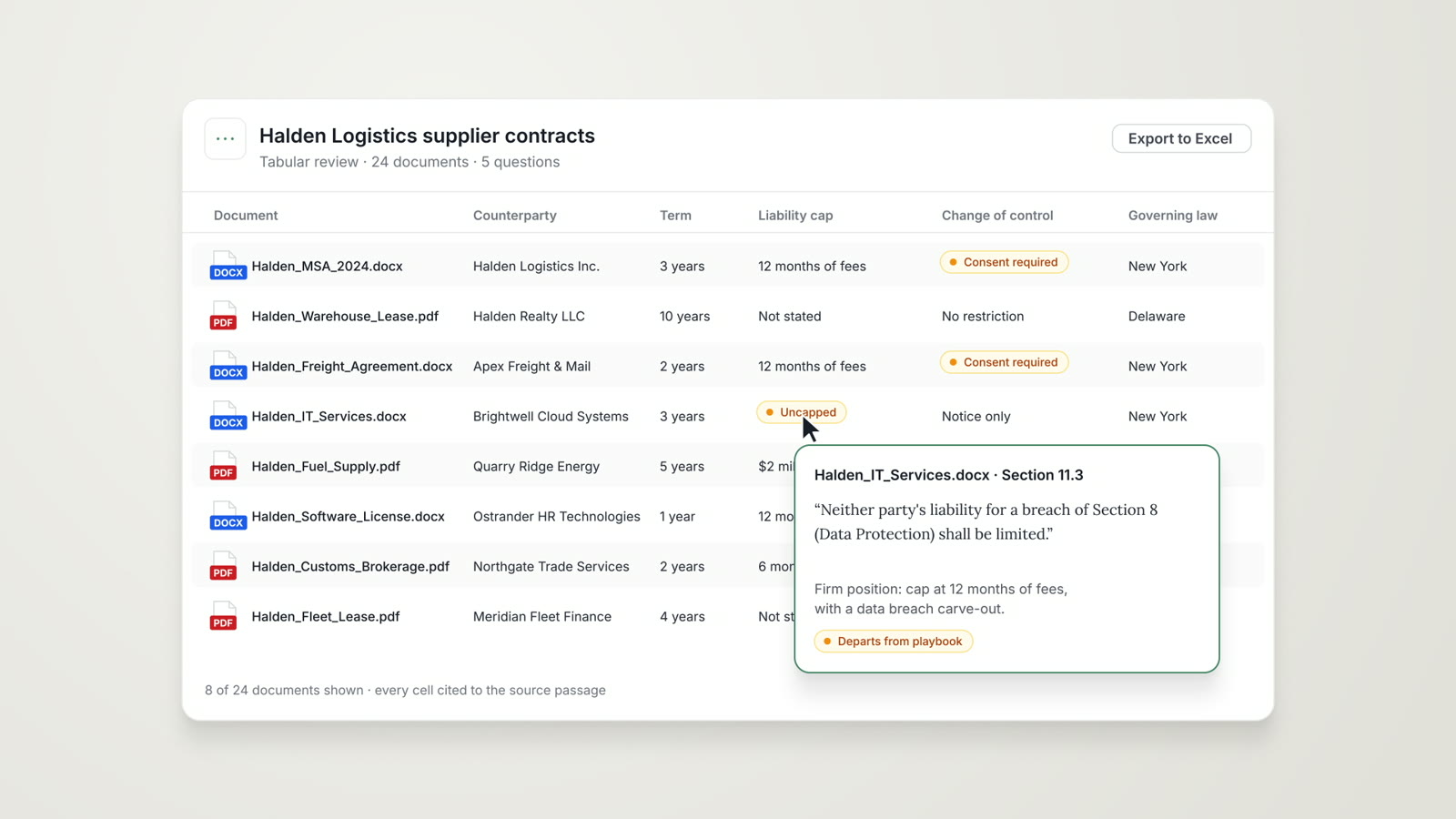
Tabular Review
The same questions across every document of a set, in one table with a citation in each cell.
Read more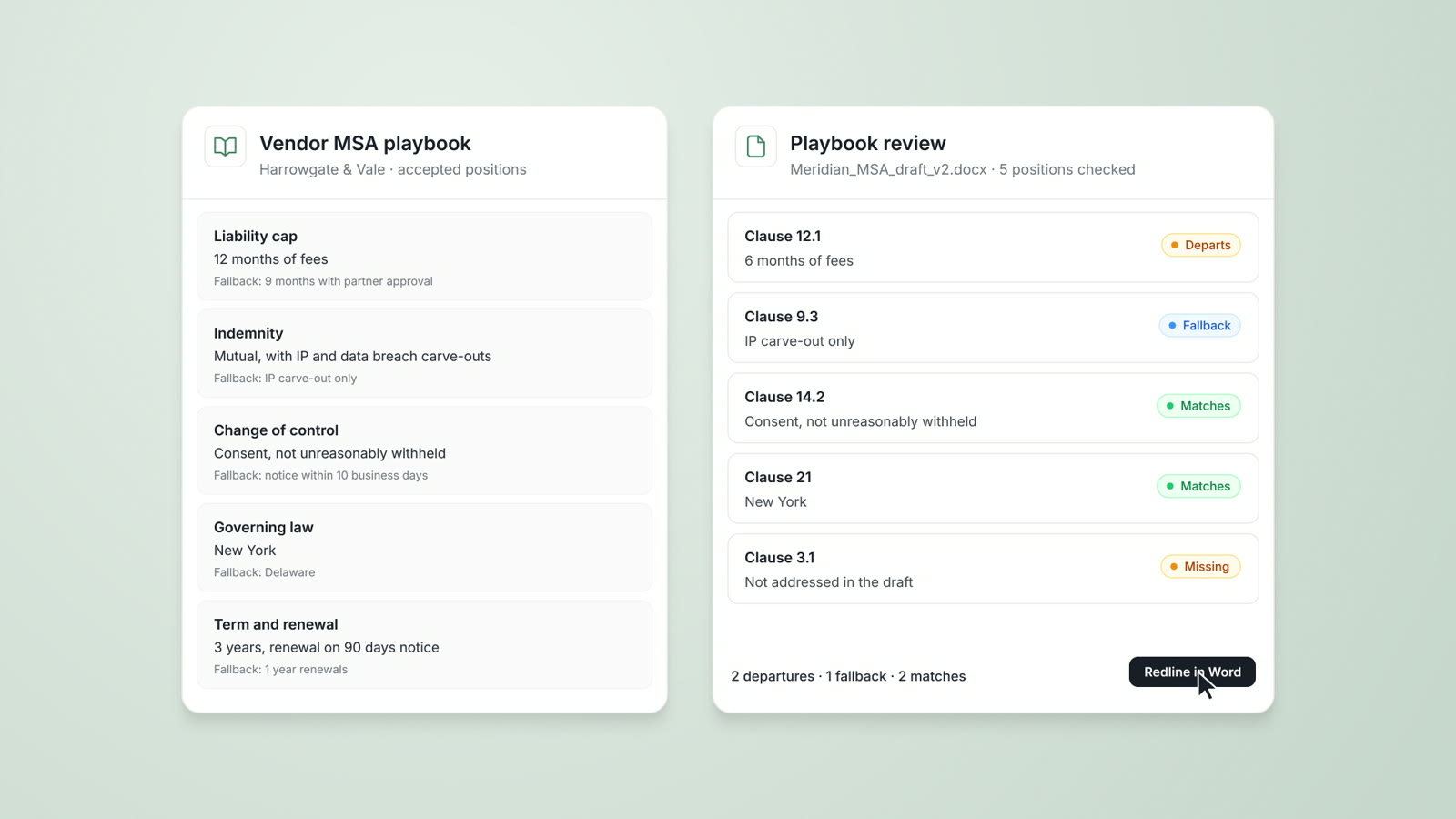
Playbooks
Your firm's approved positions, preferred language and fallbacks, checked on every document with each departure cited.
Read moreAI contract review
Contract review against your firm's playbooks and past positions, with tracked changes in Word and a citation on every flag.
Read moreQuestions attorneys ask
Which documents can AtlasAI analyze?
AtlasAI analyzes contracts, pleadings, agreements, memos and data room documents, in PDF, DOCX or scanned form.
What does the risk assessment flag?
The risk assessment flags non-standard clauses, missing provisions and potential exposure, such as an indemnification gap or a liability cap below your firm's position, with a citation for each flag.
Can AtlasAI compare a draft with our standard template?
Yes. Put the counterparty draft beside your firm's standard template, and AtlasAI highlights each difference and prepares a comparison report.
How do I check a finding?
Each finding cites the page or clause in the source document. Open the citation and read the language before you use the finding.
Can AtlasAI analyze spreadsheets?
Yes, on Enterprise. Data Analysis of XLSX and CSV files is part of the Enterprise plan.
Which plan includes Document Analysis?
Every plan includes document upload and analysis, starting with Starter at $25 per user per month. Every plan starts with a 3-day free trial on one matter. Comparisons against a playbook use Playbooks on Enterprise, and Tabular Review is part of the Professional plan.
Does AtlasAI train models on uploaded documents?
No. Under the Master Subscription Agreement, AtlasAI uses no customer data to train, fine-tune or improve any model, and every approved model provider works under zero data retention terms.